고객 서비스

판매자들은 가입하면 더 많은 혜택을 누릴 수 있습니다.

모든 주문 무료 배송.

자동차 전자 장비

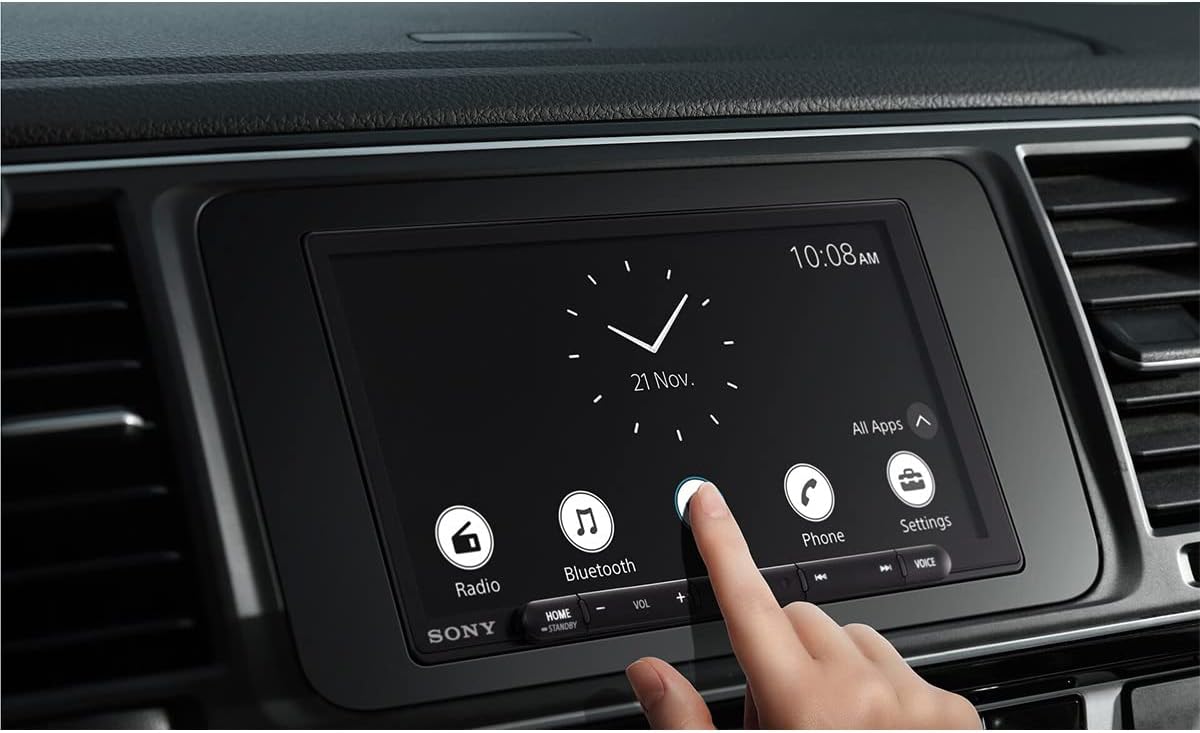
Sony XAV-AX6000 7-Inch Multimedia Receiver with Wireless Apple CarPlay/Android Auto, HDMI Video Input and Maestro Ready

4.40

지난 32시간 동안 판매됨 28

$ 548.00
$ 565.00
-3.10%

I have a 1991 Toyota mr2 and replaced an aftermarket Pioneer head unit with this one.The Pioneer didn’t have Apple car play and was a bit of a pain to navigate to play music from my phone so I decided on the Sony as a replacement.The Sony has built in car play which makes it so much easier to navigate music and it gives you navigation capabilities as well using the phone.Car play is wireless, which is awesome and the connection is easily established every time I turn on the car (it is automatic).Sound quality is fantastic. I am not running an amp but honestly I don’t need to because the sound is excellent. My front speakers are JBL club series (6 1/2), while the two small rear speakers are infinity reference speakers (4 1/2). The sound is amazing without having to use an amp. Adjustments are easy, you can set the specific fade you want and even set the eq how you want as well to get that “just right” sound.Some other great features: you can set your own splash screen, but to do so I had to buy a usb c to usb adapter to plug in a flash drive because I didn’t have a usb c flash drive and the cord supplied that plugs into the back of the unit is a usb c to usb c. It also has an hdmi input but the cord is not supplied, believe it is a mini hdmi. I didn’t use one because I’m not watching videos on the head unit.It is very easy to turn off and on, just hold the home button down and that powers the unit off. I actually use this because I have an old school automatic antenna that goes up when the radio is on, so going through a car wash can be a pain but this turns the whole thing off easily and quickly to lower the antenna.The phone features are good as well. Sound of calls is clear, interface to call is easy to use.The major con- you can’t get rid of the stupid clock graphic from the middle of the screen. Getting use to it but honestly I’m mainly in car play when driving so it isn’t that bad because the whole screen becomes the Apple screen anyway.Things I wish they had options for:1. Removing the clock graphic. It isn’t all that bad but should still be an option to remove. Besides, there is a small clock in the corner anyway when not using car play so why they put two clock graphics is mystery.2. Wish there was a way to turn off power to the antenna so it doesn’t go up when using car play. Most modern cars won’t have this problem but line is a 1991, and way back then auto antennas were all the rage.3. Better tech support. I had to search all over to see if there was a way to disable the clock graphic and to see what options were available for the antenna, their web site is about useless.Some suggestions for install: I used a wire harness that connects to my factory harness which made install easier. If you are not great at soldering or are not comfortable with soldering, there are excellent adapters that have a bit of solder in the tube and you use a heat gun to melt the tube and the solder to the wires. I tried these and install was a breeze and the connection are fantastic. Took about 5 seconds per wire.Attaching the parking brake wire in the MR2 is a pain, so I added that wire to the ground wire and it worked perfectly so I didn’t have to dismantle the entire car to attach that one wire. There is a wire that attached to the car’s electronic speed sensor, on my 91, that wire is either non-existent or is hidden so I didn’t attach that and it works fine. Believe that is used for car navigation but mine has worked fine. There is also a cord and small antenna for gps that has to be attached. It comes with self adhesive that gets attached to a supplied metal plate. That metal plate also has self adhesive that you then attach to your car. The adhesive sucks so I just stuffed it as far into my dash as I could so it was lodged and would come out- works fine. Then instructions are lacking, but stuffing the gps into the dash worked for me because the adhesive doesn’t stick to plastic, or metal, or any other surface. I contemplated gorilla glue but found a place where It fit and wouldn’t come loose.Overall, excellent head unit, great sound, great features, pretty easy install if you have ever installed a radio, and the sound- can’t say enough about the quality. In my car it is amazing!

29 현재 누군가가 웹사이트를 탐색 중입니다.

수량:
- +

예상 배송 시간: 12~26일(국제), 3~6일(미국)

구매일로부터 45일 이내에 반품이 가능합니다. 관세 및 세금은 환불되지 않습니다.

  • ASIN:

    B0B52FJ3ZG

  • BEST_SELLERS_RANK:

    #20,443 in Electronics (See Top 100 in Electronics) #140 in Car Audio Receivers

  • CUSTOMER_REVIEWS:

    4.4 4.4 out of 5 stars (115) 4.4 out of 5 stars

  • DATE_FIRST_AVAILABLE:

    June 24, 2022

  • IS_DISCONTINUED_BY_MANUFACTURER:

    No

  • ITEM_MODEL_NUMBER:

    XAV-AX6000

  • ITEM_WEIGHT:

    1 pounds

  • MANUFACTURER:

    Sony

  • PRODUCT_DIMENSIONS:

    5 x 7 x 4 inches

안전한 결제를 보장하세요

제품 상세 정보
Enjoy smooth and simple control for every journey. An anti-glare 17.6cm (6.95") diagonal capacitive touchscreen and updated interface design give you intuitive control over music, communications and more. Expanded wireless connectivity for Apple CarPlay and Android Auto, plus time-alignment and a 14-band EQ, allow for even more personlization and the perfect in-car audio experience.
고객 리뷰
4.40

(100 점수)

5
3
4
4
3
12
2
9
1
72
댓글 취소
댓글을 남겨주세요

10 논평

5.0 out of 5 stars LOVE IT.
2026-01-26    -coti chase

I got a back up cam separate . I couldn’t be happier . Sound is amazing . Back up cam goes on in reverse automatic . Get in the car it connects automatic to car play with Bluetooth and Wi-Fi on but you can turn off Bluetooth right away and it still plays. Long story short you can customize the sound . It has screen off / music playing option . Auto brightness screen. NO WIRES . which is the best part . What else , one thing I don’t like it takes about 3 seconds to start playing next song . Loads on screen right away but music playing there’s a tiny buffer ……. Idk if that’s just me or what . But can’t complain over all.UPDATE - years later I still love it !!!!The “ issue “ is 95% of the time it’s amazing.The 5% is connection issues -WHAT IVE LEARNED - cheat codes lol.So when you hop out of your car and leave it running it stays connected , and when you get back in it should play automatically . It doesn’t always do that. IF YOU PAUSE THE SONG BEFORE YOU GET OUT with ( car still running ) and get back in and hit play on either screen or phone - it works much better connection wise that way . OTHERWISE -5% of the time it will totally kick you off connection wise . WHAT I LEARNED . it will try to connect to Bluetooth which is fine whatever I use car play - but when car play isn’t auto connecting or it kicks you off . If you stay in your car and keep going back and forth forget device reconnect device praying car play will pop up . It won’t . ( usually ) - WHAT I DO .I hold down the home button for 10 seconds fully shut it off , instead of asleep . THEN - this is the best part . For whatever reason - I have to open my car door . LOCK & UNLOCK THE DOORS WITH MY KEYS . So it thinks I got out of the car or left . FOR WHATEVER reason . You have to like reset it or make Sony Purr - by locking & unlocking your car doors. BOOM CAR PLAY CONNECTION WORKS FIRST TIME EVERY TIME . If not you’ll be in and endless loop of Bluetooth connection - back and forth screaming at your car / head unit . Lmfao . Trust me I get it .Hope those cheat codes help . They really do work . Makes no sense but fully works . Lock and unlock your car doors however you want to . And then it will car play again . Again 95% of the time it’s been amazing for me personally . Hit voice button - call mom , or text mom for example - we all know that yes . ALSO - my steering wheel controls couldn’t be connected - so I’m happy af not complaining. At all pic is great BOSE speakers are great . It connects to my stock Bose speakers flawlessly . Point being IF you want a VOLUME knob , your steering wheel options may or may not be compatible . Soooooooo be prepared for that . NO KNOB FOR VOLUME . I know we all see that - just think about that as you’re driving if you want buttons to hit or if you want an easy knob to turn . Sounds basic af . But some ppl may end up hating not having a knob , etc . Just think about it that’s all . 💜💜💜

Great ...except for 1 thing missing
2026-01-16    -Genopsyde

It's lightyears ahead of the stock stereo from my 2009 Ram 2500... mostly.I love how sleek the layout is. The analog clock is clean looking. Wireless Carplay is great.My only complaint would the RADIO!There's nearly zero settings within the radio.It rarely displays RDS (Radio Data System) information such as what artist/song is playing over the air, which my stock dodge ram radio did.I miss seeing what new song is playing... I wouldn't complain but this thing was $800! and should be better than a stereo that is over 14 years old.If that's a deal breaker, then avoid this unit... though it's otherwise one of the best looking units I found.I drove my wife crazy for weeks researching, and I missed this because NO ONE mentions that RDS is flaky!I did see the artist and song flash by 'once' so I'm not 100% sure why, but it seems to only display the radio station call letters via RDS.

After installing the Sony XAV-AX6000 in my car, I’m thoroughly impressed with the overall quality and performance. First off, the design is sleek and modern, with a clean, minimal look that fits seamlessly into my dashboard. It has a premium feel, and the capacitive touch screen is incredibly responsive, making it super easy to navigate through menus, apps, and settings without any lag.One of the standout features for me is the 5V pre-out. If you're an audiophile or looking to boost your sound system, this feature makes a noticeable difference by allowing a cleaner, more powerful signal to external amplifiers. The sound quality is definitely enhanced, making it an ideal choice for anyone serious about getting the best audio performance from their setup.In terms of build quality, the XAV-AX6000 feels solid and durable, like a high-end product you’d expect from Sony. It doesn’t feel flimsy or cheap, and I appreciate that it holds up well over time.The installation process was straightforward, especially with the clear and easy-to-follow instructions provided. Even if you’re not an expert at car audio installations, you should be able to follow along with no issues.Now, while this head unit is definitely on the pricier side, I believe it’s well worth the investment. The combination of premium design, superb functionality, and top-tier sound quality justifies the cost. If you’re looking for a high-performance, reliable head unit, the XAV-AX6000 is an excellent choice.Overall, I’m extremely satisfied with this purchase, and I’d highly recommend it to anyone looking for a high-quality head unit for their vehicle.

5.0 out of 5 stars Amazing!!!
2026-01-06    -Brian

I have a 1991 Toyota mr2 and replaced an aftermarket Pioneer head unit with this one.The Pioneer didn’t have Apple car play and was a bit of a pain to navigate to play music from my phone so I decided on the Sony as a replacement.The Sony has built in car play which makes it so much easier to navigate music and it gives you navigation capabilities as well using the phone.Car play is wireless, which is awesome and the connection is easily established every time I turn on the car (it is automatic).Sound quality is fantastic. I am not running an amp but honestly I don’t need to because the sound is excellent. My front speakers are JBL club series (6 1/2), while the two small rear speakers are infinity reference speakers (4 1/2). The sound is amazing without having to use an amp. Adjustments are easy, you can set the specific fade you want and even set the eq how you want as well to get that “just right” sound.Some other great features: you can set your own splash screen, but to do so I had to buy a usb c to usb adapter to plug in a flash drive because I didn’t have a usb c flash drive and the cord supplied that plugs into the back of the unit is a usb c to usb c. It also has an hdmi input but the cord is not supplied, believe it is a mini hdmi. I didn’t use one because I’m not watching videos on the head unit.It is very easy to turn off and on, just hold the home button down and that powers the unit off. I actually use this because I have an old school automatic antenna that goes up when the radio is on, so going through a car wash can be a pain but this turns the whole thing off easily and quickly to lower the antenna.The phone features are good as well. Sound of calls is clear, interface to call is easy to use.The major con- you can’t get rid of the stupid clock graphic from the middle of the screen. Getting use to it but honestly I’m mainly in car play when driving so it isn’t that bad because the whole screen becomes the Apple screen anyway.Things I wish they had options for:1. Removing the clock graphic. It isn’t all that bad but should still be an option to remove. Besides, there is a small clock in the corner anyway when not using car play so why they put two clock graphics is mystery.2. Wish there was a way to turn off power to the antenna so it doesn’t go up when using car play. Most modern cars won’t have this problem but line is a 1991, and way back then auto antennas were all the rage.3. Better tech support. I had to search all over to see if there was a way to disable the clock graphic and to see what options were available for the antenna, their web site is about useless.Some suggestions for install: I used a wire harness that connects to my factory harness which made install easier. If you are not great at soldering or are not comfortable with soldering, there are excellent adapters that have a bit of solder in the tube and you use a heat gun to melt the tube and the solder to the wires. I tried these and install was a breeze and the connection are fantastic. Took about 5 seconds per wire.Attaching the parking brake wire in the MR2 is a pain, so I added that wire to the ground wire and it worked perfectly so I didn’t have to dismantle the entire car to attach that one wire. There is a wire that attached to the car’s electronic speed sensor, on my 91, that wire is either non-existent or is hidden so I didn’t attach that and it works fine. Believe that is used for car navigation but mine has worked fine. There is also a cord and small antenna for gps that has to be attached. It comes with self adhesive that gets attached to a supplied metal plate. That metal plate also has self adhesive that you then attach to your car. The adhesive sucks so I just stuffed it as far into my dash as I could so it was lodged and would come out- works fine. Then instructions are lacking, but stuffing the gps into the dash worked for me because the adhesive doesn’t stick to plastic, or metal, or any other surface. I contemplated gorilla glue but found a place where It fit and wouldn’t come loose.Overall, excellent head unit, great sound, great features, pretty easy install if you have ever installed a radio, and the sound- can’t say enough about the quality. In my car it is amazing!

5.0 out of 5 stars Amazing!!!
2026-01-29    -Brian

I have a 1991 Toyota mr2 and replaced an aftermarket Pioneer head unit with this one.The Pioneer didn’t have Apple car play and was a bit of a pain to navigate to play music from my phone so I decided on the Sony as a replacement.The Sony has built in car play which makes it so much easier to navigate music and it gives you navigation capabilities as well using the phone.Car play is wireless, which is awesome and the connection is easily established every time I turn on the car (it is automatic).Sound quality is fantastic. I am not running an amp but honestly I don’t need to because the sound is excellent. My front speakers are JBL club series (6 1/2), while the two small rear speakers are infinity reference speakers (4 1/2). The sound is amazing without having to use an amp. Adjustments are easy, you can set the specific fade you want and even set the eq how you want as well to get that “just right” sound.Some other great features: you can set your own splash screen, but to do so I had to buy a usb c to usb adapter to plug in a flash drive because I didn’t have a usb c flash drive and the cord supplied that plugs into the back of the unit is a usb c to usb c. It also has an hdmi input but the cord is not supplied, believe it is a mini hdmi. I didn’t use one because I’m not watching videos on the head unit.It is very easy to turn off and on, just hold the home button down and that powers the unit off. I actually use this because I have an old school automatic antenna that goes up when the radio is on, so going through a car wash can be a pain but this turns the whole thing off easily and quickly to lower the antenna.The phone features are good as well. Sound of calls is clear, interface to call is easy to use.The major con- you can’t get rid of the stupid clock graphic from the middle of the screen. Getting use to it but honestly I’m mainly in car play when driving so it isn’t that bad because the whole screen becomes the Apple screen anyway.Things I wish they had options for:1. Removing the clock graphic. It isn’t all that bad but should still be an option to remove. Besides, there is a small clock in the corner anyway when not using car play so why they put two clock graphics is mystery.2. Wish there was a way to turn off power to the antenna so it doesn’t go up when using car play. Most modern cars won’t have this problem but line is a 1991, and way back then auto antennas were all the rage.3. Better tech support. I had to search all over to see if there was a way to disable the clock graphic and to see what options were available for the antenna, their web site is about useless.Some suggestions for install: I used a wire harness that connects to my factory harness which made install easier. If you are not great at soldering or are not comfortable with soldering, there are excellent adapters that have a bit of solder in the tube and you use a heat gun to melt the tube and the solder to the wires. I tried these and install was a breeze and the connection are fantastic. Took about 5 seconds per wire.Attaching the parking brake wire in the MR2 is a pain, so I added that wire to the ground wire and it worked perfectly so I didn’t have to dismantle the entire car to attach that one wire. There is a wire that attached to the car’s electronic speed sensor, on my 91, that wire is either non-existent or is hidden so I didn’t attach that and it works fine. Believe that is used for car navigation but mine has worked fine. There is also a cord and small antenna for gps that has to be attached. It comes with self adhesive that gets attached to a supplied metal plate. That metal plate also has self adhesive that you then attach to your car. The adhesive sucks so I just stuffed it as far into my dash as I could so it was lodged and would come out- works fine. Then instructions are lacking, but stuffing the gps into the dash worked for me because the adhesive doesn’t stick to plastic, or metal, or any other surface. I contemplated gorilla glue but found a place where It fit and wouldn’t come loose.Overall, excellent head unit, great sound, great features, pretty easy install if you have ever installed a radio, and the sound- can’t say enough about the quality. In my car it is amazing!

Awesome receiver
2026-02-05    -Colby

Looks great. Probably one of the cleanest looking aftermarket stereos. Great stereo upgrade that doesn’t look like aftermarket stereos from the 90s. CarPlay works good and I love the customizable background option.

After installing the Sony XAV-AX6000 in my car, I’m thoroughly impressed with the overall quality and performance. First off, the design is sleek and modern, with a clean, minimal look that fits seamlessly into my dashboard. It has a premium feel, and the capacitive touch screen is incredibly responsive, making it super easy to navigate through menus, apps, and settings without any lag.One of the standout features for me is the 5V pre-out. If you're an audiophile or looking to boost your sound system, this feature makes a noticeable difference by allowing a cleaner, more powerful signal to external amplifiers. The sound quality is definitely enhanced, making it an ideal choice for anyone serious about getting the best audio performance from their setup.In terms of build quality, the XAV-AX6000 feels solid and durable, like a high-end product you’d expect from Sony. It doesn’t feel flimsy or cheap, and I appreciate that it holds up well over time.The installation process was straightforward, especially with the clear and easy-to-follow instructions provided. Even if you’re not an expert at car audio installations, you should be able to follow along with no issues.Now, while this head unit is definitely on the pricier side, I believe it’s well worth the investment. The combination of premium design, superb functionality, and top-tier sound quality justifies the cost. If you’re looking for a high-performance, reliable head unit, the XAV-AX6000 is an excellent choice.Overall, I’m extremely satisfied with this purchase, and I’d highly recommend it to anyone looking for a high-quality head unit for their vehicle.

Awesome receiver
2026-02-24    -Colby

Looks great. Probably one of the cleanest looking aftermarket stereos. Great stereo upgrade that doesn’t look like aftermarket stereos from the 90s. CarPlay works good and I love the customizable background option.

Great ...except for 1 thing missing
2026-01-31    -Genopsyde

It's lightyears ahead of the stock stereo from my 2009 Ram 2500... mostly.I love how sleek the layout is. The analog clock is clean looking. Wireless Carplay is great.My only complaint would the RADIO!There's nearly zero settings within the radio.It rarely displays RDS (Radio Data System) information such as what artist/song is playing over the air, which my stock dodge ram radio did.I miss seeing what new song is playing... I wouldn't complain but this thing was $800! and should be better than a stereo that is over 14 years old.If that's a deal breaker, then avoid this unit... though it's otherwise one of the best looking units I found.I drove my wife crazy for weeks researching, and I missed this because NO ONE mentions that RDS is flaky!I did see the artist and song flash by 'once' so I'm not 100% sure why, but it seems to only display the radio station call letters via RDS.

5.0 out of 5 stars LOVE IT.
2026-02-22    -coti chase

I got a back up cam separate . I couldn’t be happier . Sound is amazing . Back up cam goes on in reverse automatic . Get in the car it connects automatic to car play with Bluetooth and Wi-Fi on but you can turn off Bluetooth right away and it still plays. Long story short you can customize the sound . It has screen off / music playing option . Auto brightness screen. NO WIRES . which is the best part . What else , one thing I don’t like it takes about 3 seconds to start playing next song . Loads on screen right away but music playing there’s a tiny buffer ……. Idk if that’s just me or what . But can’t complain over all.UPDATE - years later I still love it !!!!The “ issue “ is 95% of the time it’s amazing.The 5% is connection issues -WHAT IVE LEARNED - cheat codes lol.So when you hop out of your car and leave it running it stays connected , and when you get back in it should play automatically . It doesn’t always do that. IF YOU PAUSE THE SONG BEFORE YOU GET OUT with ( car still running ) and get back in and hit play on either screen or phone - it works much better connection wise that way . OTHERWISE -5% of the time it will totally kick you off connection wise . WHAT I LEARNED . it will try to connect to Bluetooth which is fine whatever I use car play - but when car play isn’t auto connecting or it kicks you off . If you stay in your car and keep going back and forth forget device reconnect device praying car play will pop up . It won’t . ( usually ) - WHAT I DO .I hold down the home button for 10 seconds fully shut it off , instead of asleep . THEN - this is the best part . For whatever reason - I have to open my car door . LOCK & UNLOCK THE DOORS WITH MY KEYS . So it thinks I got out of the car or left . FOR WHATEVER reason . You have to like reset it or make Sony Purr - by locking & unlocking your car doors. BOOM CAR PLAY CONNECTION WORKS FIRST TIME EVERY TIME . If not you’ll be in and endless loop of Bluetooth connection - back and forth screaming at your car / head unit . Lmfao . Trust me I get it .Hope those cheat codes help . They really do work . Makes no sense but fully works . Lock and unlock your car doors however you want to . And then it will car play again . Again 95% of the time it’s been amazing for me personally . Hit voice button - call mom , or text mom for example - we all know that yes . ALSO - my steering wheel controls couldn’t be connected - so I’m happy af not complaining. At all pic is great BOSE speakers are great . It connects to my stock Bose speakers flawlessly . Point being IF you want a VOLUME knob , your steering wheel options may or may not be compatible . Soooooooo be prepared for that . NO KNOB FOR VOLUME . I know we all see that - just think about that as you’re driving if you want buttons to hit or if you want an easy knob to turn . Sounds basic af . But some ppl may end up hating not having a knob , etc . Just think about it that’s all . 💜💜💜

댓글을 남겨주세요:

댓글 제목
댓글 내용
배송 및 반품
우리가 당신을 보호하겠습니다

대부분 지역에서는 배송비를 한 번만 지불하시면 됩니다 (주문 및 배송 페이지를 확인해 주세요).

구매 후 14일 이내 무료 반품 가능 (단, 수명이 다한 제품, 맞춤 제작 상품, 마스크, 향수 및 에어로졸과 같이 위험하거나 인화성 물질이 포함된 일부 제품은 제외).

수입 관세 정보

복잡한 절차는 저희가 처리해 드리겠습니다. 카나리아 제도를 제외한 모든 EU 국가, 영국, 미국, 캐나다, 호주, 뉴질랜드, 푸에르토리코, 스위스, 싱가포르, 한국, 쿠웨이트, 멕시코, 카타르, 인도, 노르웨이, 사우디아라비아, 대만, 태국, UAE, 일본, 브라질, 맨섬, 산마리노, 콜롬비아, 칠레, 아르헨티나, 이집트, 레바논, 홍콩 특별행정구, 바레인, 터키로 배송되는 상품 가격에는 모든 수입 관세가 포함되어 있습니다. 표시된 가격이 최종 결제 금액입니다.

예상 배송 시간

특급 배송: 7-10일

해당 창고에서 배송되었습니다.

더 자세한 정보가 필요하신가요?
반품 정책
반품 정책

저희는 제품 품질에 자신 있습니다. 만약 구매하신 제품에 완전히 만족하지 못하신다면, 수령일로부터 30일 이내에 간편하게 반품하실 수 있도록 정책을 마련해 두었습니다.

간편한 교환 또는 환불
  • 다른 사이즈, 색상 또는 스타일의 상품으로 교환하거나 전액 환불받을 수 있습니다.
  • 반품되는 모든 상품은 착용하지 않은 상태여야 하며, 원래 포장 상태 그대로 모든 태그가 손상되지 않은 상태여야 합니다.
간단한 절차
  • 온라인으로 반품을 신청하거나 고객 서비스 팀에 문의하여 도움을 받으실 수 있습니다.
  • 물품을 제대로 포장해 주시고, 원래의 포장 목록도 함께 넣어주세요.
  • 반품하실 상품을 보내주실 때에는 저희가 제공해 드린 선불 배송 라벨을 사용해 주시기 바랍니다.
  • 환불 요청 접수 즉시 처리해 드리겠습니다.

반품과 관련하여 궁금한 점이나 우려 사항이 있으시면 언제든지 저희 전문 고객 서비스 팀에 문의해 주세요. 고객 만족은 저희의 최우선 목표입니다.

범주
차이
제품
모든 제품 지우기