고객 서비스

판매자들은 가입하면 더 많은 혜택을 누릴 수 있습니다.

모든 주문 무료 배송.

하드디스크

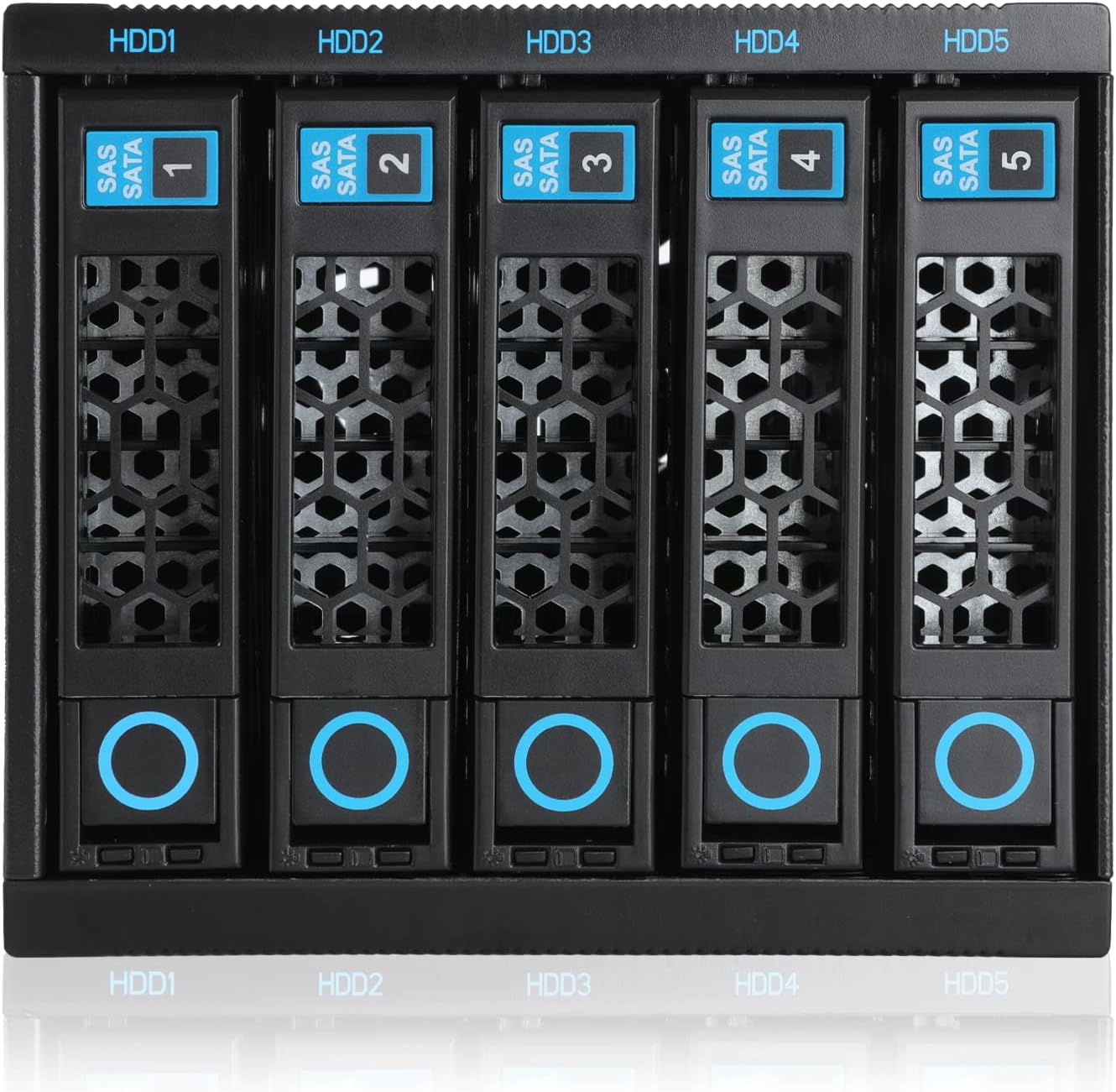
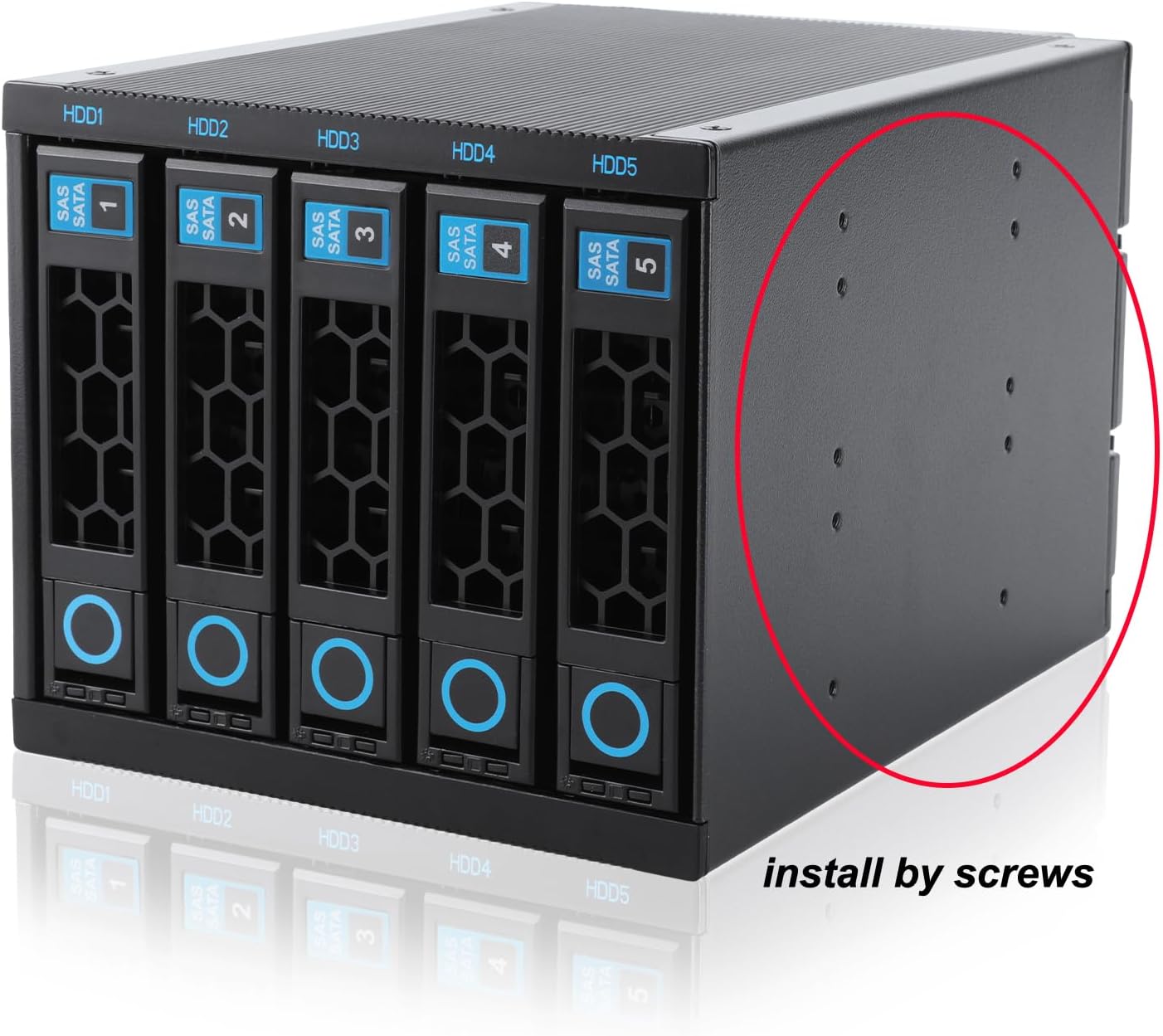
RackChoice Internal Hard Drive Enclosure 5x2.5”/3.5” SATA/SAS Hard Drive Backplane 6 Gbps HDD hotswap in 3xExternal 5.25" Bay Compatible with All Rack Types

3.90

지난 32시간 동안 판매됨 33

$ 92.00
$ 98.00
-6.52%

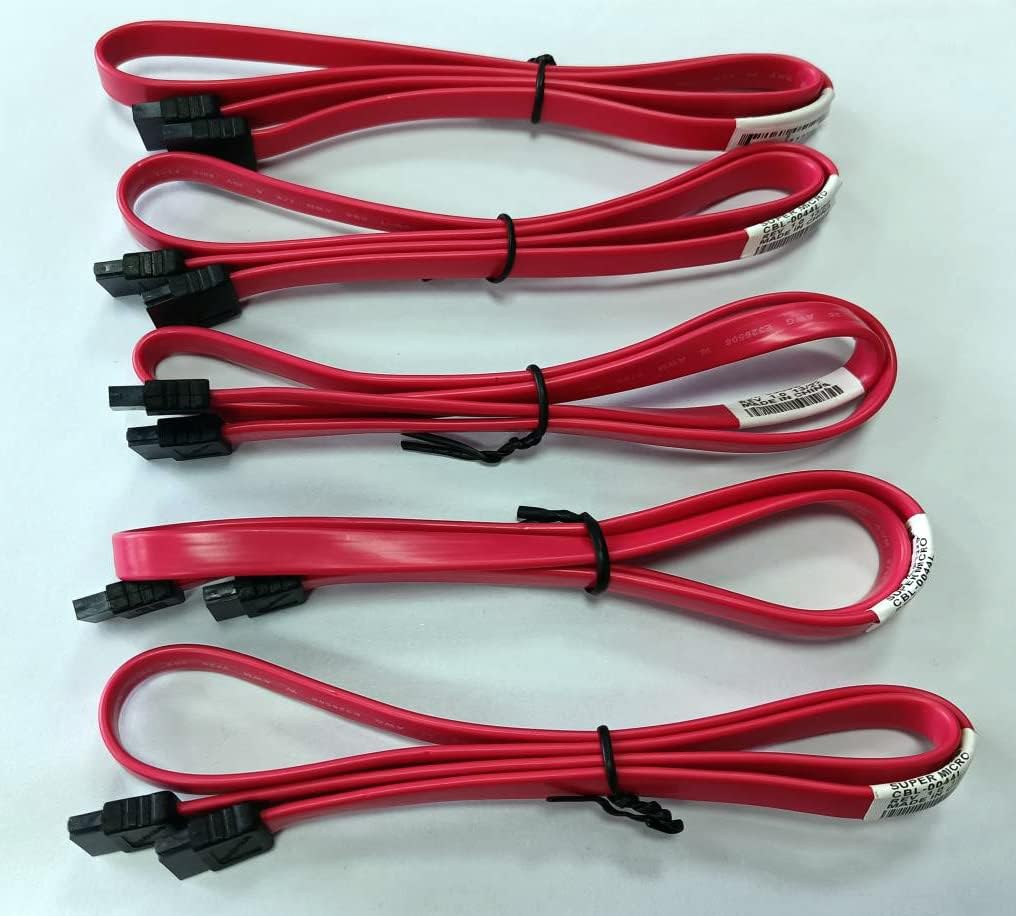
I bought two of the RackChoice Internal Hard Drive Enclosures on sale for use in a CoolerMaster tower with 6 exposed 5.25 bays. I run an UnRaid server with 10 HDD/SSDs and this is a perfect solution. As other reviewers have noted I had to make minor modifications to the internal bays of the CoolerMaster tower, bending some tabs out of the way to fit the 5-in-3 enclosures but otherwise it was a simple plug-and-play. No instructions needed. The enclosures have 2 Molex power connectors for redundancy, assuming you have two separate independent power rails and you choose to use them in a redundant fashion. Otherwise a single power connection from the PSU to the enclosure works fine. I am powering 5 HDD on a single power rail without issue using a 750W PSU.The HDD sleds require no screws to mount a 3.5 HDD, they just snap-in-place. For 2.5 SSDs screws are required and supplied with enclosure along with 5 SATA cables, but I chose to use my own cables. The sleds latch into place with minimal effort and hold the drives securely in the enclosure. The power and activity lights on each sled work as expected, so you can see at glance what bays have drives installed and when they are active.I did replace the fans in the enclosures with Noctua NF-A8 FLX 80mm fans as mentioned in another review. I have used Noctua fans in other builds and they are excellent and silent fans. It’s not that the stock fans are bad or excessively loud, but for my application and server location I wanted something a bit quieter and lower pitched. I think a lot may depend on your case size/design and the other fans installed in the case as to whether noise is an issue for you. The stock fans run at 2500rpm and in their favor they do keep the 5-in-3 enclosures a few degrees cooler then the Noctua NF-A8 that have set to run 1650rpm which is the middle speed. Even so my drive temperatures range from 29C to 34C under normal use after replacing the stock fans vs. 27C to 33C with the stock fans.Bottomline is that RackChoice Internal Hard Drive Enclosures are a good value and work well if you are looking to clean up you case and have easy access to your drives for replacement. Just to put a final point this: These enclosures are for internal use only. They have no internal controllers and are not a standalone NAS. Read the description carefully before purchasing.

19 현재 누군가가 웹사이트를 탐색 중입니다.

수량:
- +

예상 배송 시간: 12~26일(국제), 3~6일(미국)

구매일로부터 45일 이내에 반품이 가능합니다. 관세 및 세금은 환불되지 않습니다.

  • ASIN:

    B0BV142WM5

  • BEST_SELLERS_RANK:

    #176 in Enclosures

  • CUSTOMER_REVIEWS:

    3.9 3.9 out of 5 stars (114) 3.9 out of 5 stars

  • DATE_FIRST_AVAILABLE:

    October 19, 2022

  • ITEM_MODEL_NUMBER:

    R35-6GB

  • ITEM_WEIGHT:

    4.27 pounds

  • MANUFACTURER:

    RackChoice

  • PRODUCT_DIMENSIONS:

    8.86 x 5.75 x 5 inches

안전한 결제를 보장하세요

제품 상세 정보
고객 리뷰
3.90

(100 점수)

5
14
4
5
3
6
2
20
1
55
댓글 취소
댓글을 남겨주세요

14 논평

4.0 out of 5 stars Exceeded Expectations
2026-03-05    -Lew Cass

I bought this to replace an Icy Dock originally in my Unraid home server. At the time I chose the Icy Dock I opted not to spend the extra money for a "tool-less" design, but have since regretted that choice every time I needed to swap out hard drives, and had to mess with four tiny screws to mount each drive in it's sled. So I decided to switch.The Rack Choice is considerably less expensive than the Icy Dock. Apparently it was deliberate on the part of Rack Choice to opt for lower cost using lighter gauge metal and more plastic. While the Icy Dock has a very solid and precise mechanical construction with a high-end feel, I think the choices made by Rack Choice make sense from a value proposition. The design and materials actually function better than I expected. (The unanswered question is whether it will be reliable long term.)As noted in other reviews, for some reason the spacing between the drive sleds is slightly inconsistent, so the design appears to lack some precision. But that's merely an aesthetic flaw. From a functional aspect it works fine. All four 3.5" HDDs (installed tool-less-ly) and an SSD (installed in the sled with supplied screws) mated seamlessly with the connectors. The insertion and removal is smooth and precise, although not with the extremely solid "feel" of the Icy Dock.I did run into one problem using the tool-less thumbscrews supplied with my case to mount the Rack Choice in the case's drive bay. Those screws proved to be a bit too long and impeded the right-most ("HDD5") sled, so I had to use the shorter Philips head screws supplied by Rack Choice.The performance of the Rack Choice 80mm cooling fan actually surpasses the more expensive Icy Dock's two-speed 80mm fan. The Icy Dock's low speed provided less airflow than I found necessary, while the high speed was far too noisy. The Rack Choice fan provides better overall cooling without excessive noise. It's likely aided by the less restrictive airflow design of it's drive sleds relative to the Icy Dock's.Since Icy Dock has been using SATA power connectors for some time, I thought the use of the Molex power connectors by Rack Choice to be a bit surprising. However Rack Choice uses two of the Molex, simplifying their design compared to the Icy Dock's with three SATA power connectors. I'm guessing that the Molex connectors are rated to handle higher amperage. Icy Dock's three SATA power connectors result in a messier rear panel with power and data connectors scattered all over in various orientations, whereas the Rack Choice connectors are laid out adjacently resulting in a cleaner design with connectors easier to access from inside the server case. On the other hand, the two Molex sockets are tightly adjacent leaving no room for "squeeze-to-release" Molex connectors, so I had to bend the "squeezers" out of the way for my Molex plugs to insert.Overall, while there are various tradeoffs, I am very pleased with the Rack Choice product. I think thoughtful choices where made to achieve a good value / performance ratio.

I bought two of the RackChoice Internal Hard Drive Enclosures on sale for use in a CoolerMaster tower with 6 exposed 5.25 bays. I run an UnRaid server with 10 HDD/SSDs and this is a perfect solution. As other reviewers have noted I had to make minor modifications to the internal bays of the CoolerMaster tower, bending some tabs out of the way to fit the 5-in-3 enclosures but otherwise it was a simple plug-and-play. No instructions needed. The enclosures have 2 Molex power connectors for redundancy, assuming you have two separate independent power rails and you choose to use them in a redundant fashion. Otherwise a single power connection from the PSU to the enclosure works fine. I am powering 5 HDD on a single power rail without issue using a 750W PSU.The HDD sleds require no screws to mount a 3.5 HDD, they just snap-in-place. For 2.5 SSDs screws are required and supplied with enclosure along with 5 SATA cables, but I chose to use my own cables. The sleds latch into place with minimal effort and hold the drives securely in the enclosure. The power and activity lights on each sled work as expected, so you can see at glance what bays have drives installed and when they are active.I did replace the fans in the enclosures with Noctua NF-A8 FLX 80mm fans as mentioned in another review. I have used Noctua fans in other builds and they are excellent and silent fans. It’s not that the stock fans are bad or excessively loud, but for my application and server location I wanted something a bit quieter and lower pitched. I think a lot may depend on your case size/design and the other fans installed in the case as to whether noise is an issue for you. The stock fans run at 2500rpm and in their favor they do keep the 5-in-3 enclosures a few degrees cooler then the Noctua NF-A8 that have set to run 1650rpm which is the middle speed. Even so my drive temperatures range from 29C to 34C under normal use after replacing the stock fans vs. 27C to 33C with the stock fans.Bottomline is that RackChoice Internal Hard Drive Enclosures are a good value and work well if you are looking to clean up you case and have easy access to your drives for replacement. Just to put a final point this: These enclosures are for internal use only. They have no internal controllers and are not a standalone NAS. Read the description carefully before purchasing.

I love it
2026-01-13    -Amazon Customer

I love this drive bay! Unfortunately it can't go all the way into my case (the case is quite small, so it hits my ram) but it doesn't look too bad sticking out a bit!I love having access to the drives, hot swsping works great, but the main reason I wanted this is it keeps my drives cool. No overheating anymore.I think my next case will be bigger, and with more 5.25" drive bays so I can get. A second one of these.

best way to add HDD to your server
2026-01-24    -Etienne

Pretty nice enclosure! I was able to add 5 more drive to my server for a fraction of the price of a genuine Drive cages!

Arrived quickly and intact
2026-01-02    -Ewijk

Arrived quickly and was installed easily into my server all drive bays seem to be operational and cooling fan is not too loud,keeps my drives between 37 and 33 degrees.only thing I would say is that you need to solidly seat the drive tray or it may not see the drive especially ssds.

Arrived quickly and intact
2026-02-15    -Ewijk

Arrived quickly and was installed easily into my server all drive bays seem to be operational and cooling fan is not too loud,keeps my drives between 37 and 33 degrees.only thing I would say is that you need to solidly seat the drive tray or it may not see the drive especially ssds.

4.0 out of 5 stars Exceeded Expectations
2026-01-08    -Lew Cass

I bought this to replace an Icy Dock originally in my Unraid home server. At the time I chose the Icy Dock I opted not to spend the extra money for a "tool-less" design, but have since regretted that choice every time I needed to swap out hard drives, and had to mess with four tiny screws to mount each drive in it's sled. So I decided to switch.The Rack Choice is considerably less expensive than the Icy Dock. Apparently it was deliberate on the part of Rack Choice to opt for lower cost using lighter gauge metal and more plastic. While the Icy Dock has a very solid and precise mechanical construction with a high-end feel, I think the choices made by Rack Choice make sense from a value proposition. The design and materials actually function better than I expected. (The unanswered question is whether it will be reliable long term.)As noted in other reviews, for some reason the spacing between the drive sleds is slightly inconsistent, so the design appears to lack some precision. But that's merely an aesthetic flaw. From a functional aspect it works fine. All four 3.5" HDDs (installed tool-less-ly) and an SSD (installed in the sled with supplied screws) mated seamlessly with the connectors. The insertion and removal is smooth and precise, although not with the extremely solid "feel" of the Icy Dock.I did run into one problem using the tool-less thumbscrews supplied with my case to mount the Rack Choice in the case's drive bay. Those screws proved to be a bit too long and impeded the right-most ("HDD5") sled, so I had to use the shorter Philips head screws supplied by Rack Choice.The performance of the Rack Choice 80mm cooling fan actually surpasses the more expensive Icy Dock's two-speed 80mm fan. The Icy Dock's low speed provided less airflow than I found necessary, while the high speed was far too noisy. The Rack Choice fan provides better overall cooling without excessive noise. It's likely aided by the less restrictive airflow design of it's drive sleds relative to the Icy Dock's.Since Icy Dock has been using SATA power connectors for some time, I thought the use of the Molex power connectors by Rack Choice to be a bit surprising. However Rack Choice uses two of the Molex, simplifying their design compared to the Icy Dock's with three SATA power connectors. I'm guessing that the Molex connectors are rated to handle higher amperage. Icy Dock's three SATA power connectors result in a messier rear panel with power and data connectors scattered all over in various orientations, whereas the Rack Choice connectors are laid out adjacently resulting in a cleaner design with connectors easier to access from inside the server case. On the other hand, the two Molex sockets are tightly adjacent leaving no room for "squeeze-to-release" Molex connectors, so I had to bend the "squeezers" out of the way for my Molex plugs to insert.Overall, while there are various tradeoffs, I am very pleased with the Rack Choice product. I think thoughtful choices where made to achieve a good value / performance ratio.

Quality
2026-02-04    -Gary Brown

Took a little while to arrive as coming from another country, build quality is excellent and works very well with my SAS drives /SATA card combination, hot-swap seem to be quite reliable and hasn't had any issues finding drive when inserted.

best way to add HDD to your server
2026-01-19    -Etienne

Pretty nice enclosure! I was able to add 5 more drive to my server for a fraction of the price of a genuine Drive cages!

Quality
2026-01-18    -Gary Brown

Took a little while to arrive as coming from another country, build quality is excellent and works very well with my SAS drives /SATA card combination, hot-swap seem to be quite reliable and hasn't had any issues finding drive when inserted.

댓글을 남겨주세요:

댓글 제목
댓글 내용
배송 및 반품
우리가 당신을 보호하겠습니다

대부분 지역에서는 배송비를 한 번만 지불하시면 됩니다 (주문 및 배송 페이지를 확인해 주세요).

구매 후 14일 이내 무료 반품 가능 (단, 수명이 다한 제품, 맞춤 제작 상품, 마스크, 향수 및 에어로졸과 같이 위험하거나 인화성 물질이 포함된 일부 제품은 제외).

수입 관세 정보

복잡한 절차는 저희가 처리해 드리겠습니다. 카나리아 제도를 제외한 모든 EU 국가, 영국, 미국, 캐나다, 호주, 뉴질랜드, 푸에르토리코, 스위스, 싱가포르, 한국, 쿠웨이트, 멕시코, 카타르, 인도, 노르웨이, 사우디아라비아, 대만, 태국, UAE, 일본, 브라질, 맨섬, 산마리노, 콜롬비아, 칠레, 아르헨티나, 이집트, 레바논, 홍콩 특별행정구, 바레인, 터키로 배송되는 상품 가격에는 모든 수입 관세가 포함되어 있습니다. 표시된 가격이 최종 결제 금액입니다.

예상 배송 시간

특급 배송: 7-10일

해당 창고에서 배송되었습니다.

더 자세한 정보가 필요하신가요?
반품 정책
반품 정책

저희는 제품 품질에 자신 있습니다. 만약 구매하신 제품에 완전히 만족하지 못하신다면, 수령일로부터 30일 이내에 간편하게 반품하실 수 있도록 정책을 마련해 두었습니다.

간편한 교환 또는 환불
  • 다른 사이즈, 색상 또는 스타일의 상품으로 교환하거나 전액 환불받을 수 있습니다.
  • 반품되는 모든 상품은 착용하지 않은 상태여야 하며, 원래 포장 상태 그대로 모든 태그가 손상되지 않은 상태여야 합니다.
간단한 절차
  • 온라인으로 반품을 신청하거나 고객 서비스 팀에 문의하여 도움을 받으실 수 있습니다.
  • 물품을 제대로 포장해 주시고, 원래의 포장 목록도 함께 넣어주세요.
  • 반품하실 상품을 보내주실 때에는 저희가 제공해 드린 선불 배송 라벨을 사용해 주시기 바랍니다.
  • 환불 요청 접수 즉시 처리해 드리겠습니다.

반품과 관련하여 궁금한 점이나 우려 사항이 있으시면 언제든지 저희 전문 고객 서비스 팀에 문의해 주세요. 고객 만족은 저희의 최우선 목표입니다.

범주
차이
제품
모든 제품 지우기