고객 서비스

판매자들은 가입하면 더 많은 혜택을 누릴 수 있습니다.

모든 주문 무료 배송.

온도 조절기

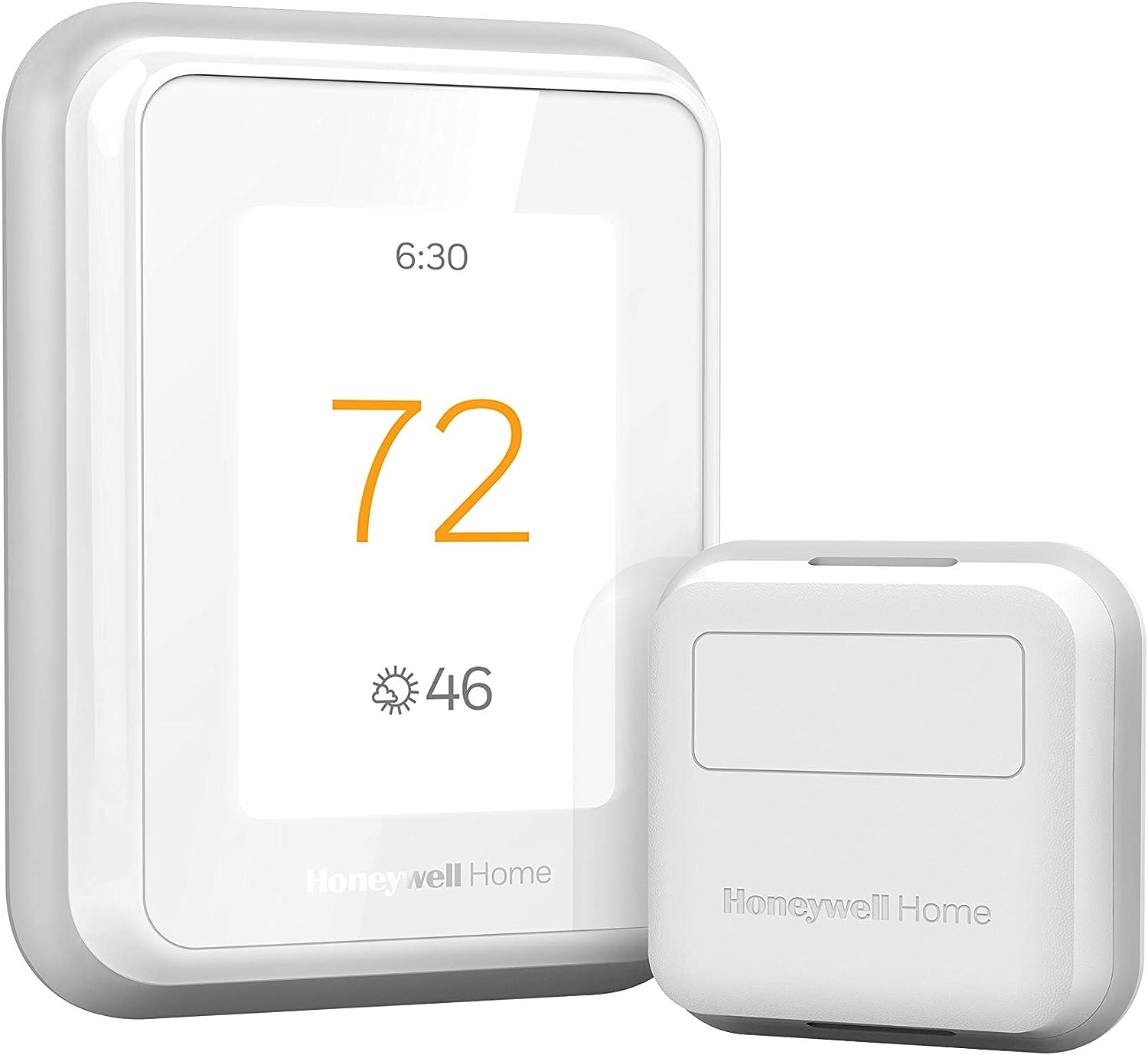
Honeywell Home T9 WiFi Smart Thermostat with 1 Smart Room Sensor, Touchscreen Display, White

4.30

지난 32시간 동안 판매됨 42

$ 194.54
$ 210.00
-7.95%

First the install is very easy if you are replacing an existing thermostat that has a C wire, a C wire adapter is included but I did not need that in my case. Secondly if you are replacing an existing thermostat, especially the traditional rectangular form factor, I HIGHLY RECOMMEND purchasing the THP2400A1080 wall plate adapter or the generic version which is much cheaper. It makes install of the T9 even easier.This thermostat has 3 holes you need to drill which are probably not in the location of the ones for your old thermostat. The wall adapter allows you to use the existing holes from your old thermostat then the UWP/mounting plate from the T9 (or any honeywell thermostat that uses the UWP) just clicks onto the adapter without new holes to drill. The cover plate from the wall adapter is then large enough to cover the area of your old thermostat.Now for a review of thermostat itself. My setup is a 2 story home with single stage forced air AC with a single stage gas furnace on a 2 zone system (upstairs and downstairs) so I bought 2 T9's that replaced 2 old smart thermostat (old honeywell with basic wifi and online scheduling capability). The old thermostats worked fine but I upgraded to the T9 to hopefully mitigate unbalanced temps between rooms on the same floor as well as between the 2 floors. It absolutely worked as I had hoped. It has only been a few days but I can immediately tell the difference in temperature balance between the rooms and the floors in over 100 degree weather.How are these thermostats helping balance the air temp? First the room sensors allow you to prioritize which rooms are being used for temp readings at different times of day or based on activity. This can be done by either specifying a single room (or group of rooms to average the temperature) or by activity (also individual room or averaging multiple rooms). During the day I can prioritize the living spaces and at night the bedrooms for temp readings. This combined with the auto recirculation mode of the fan allows the fan to recirc air about 20 minutes every hour even when the heating or cooling isn't actually running. Over the course of a day this really has helped balance the air between rooms and between the floors on my 2 zone system. Using the energy monitoring from my solar panel system I can already see a drop in energy usage as my AC has not had to run as much overall to make the occupied rooms comfortable.Also my thermostats are in stupid locations so the room sensors help with that. The UWP on the T9 is great as one of my thermostats is on the wall between the house and the garage which has a large hole for the thermostat wiring. The UWP for the T9 has a door that closes off that hole and the wiring before you attach the thermostat, so it is not reading any of that hot air coming from the wall. I confirmed this as my old thermostat use to read 2 degrees hotter than the rest of the hallway, verified with a separate thermometer, on a 100 degree day. The T9 now reads the same as the thermometerIn terms of why I chose the T9 over a Ecobee or a Nest, basically the T9 generally is cheaper. The T9 thermostat with a room sensor can be had for as little as $143. The other popular options cost more. While the additional features of the others may be worth it to some I simply would not use those features. For example, I am not going to talk to my thermostat. I am just gonna set the schedules and let the thermostat do its think and it still has integration to those systems if I choose to have that functionality later.Overall, great value smart thermostat that does what it needs to do. If I had one complaint is that this thermostat, and Honeywell thermostats in general don't allow you to adjust the differential (the plus or minus above or below the setpoint the thermostat kicks on or off the air/heat) This seems to be set at a +/- of 1 degree and no way to change it. Some may prefer a differential of 1.5 to 2 degrees instead. This is somewhat mitigated by using multiple sensors to average the temperature but a differential setting adjustment would of made this thermostat almost perfect.

17 현재 누군가가 웹사이트를 탐색 중입니다.

수량:
- +

예상 배송 시간: 12~26일(국제), 3~6일(미국)

구매일로부터 45일 이내에 반품이 가능합니다. 관세 및 세금은 환불되지 않습니다.

  • ASIN:

    B07N849J21

  • BACKLIGHT:

    Yes

  • BATTERIES:

    2 AAA batteries required. (included)

  • BATTERIES_INCLUDED:

    Yes

  • BATTERIES_REQUIRED:

    Yes

  • BATTERY_CELL_TYPE:

    Alkaline

  • BEST_SELLERS_RANK:

    #5,804 in Tools & Home Improvement (See Top 100 in Tools & Home Improvement) #17 in Home Programmable Thermostats

  • BRAND:

    Honeywell Home

  • COLOR:

    White

  • CONNECTIVITY_PROTOCOL:

    Wi-Fi

  • CONNECTIVITY_TECHNOLOGY:

    Wi-Fi

  • CONTROL_METHOD:

    Voice

  • CONTROL_TYPE:

    Touch

  • CONTROLLER_TYPE:

    Amazon Alexa, Google Assistant, SmartThings, Vera

  • CUSTOMER_REVIEWS:

    4.3 4.3 out of 5 stars (2,909) 4.3 out of 5 stars

  • DATE_FIRST_AVAILABLE:

    February 15, 2019

  • DISPLAY_TYPE:

    LCD

  • FINISH:

    Glossy

  • FINISH_TYPE:

    Glossy

  • GLOBAL_TRADE_IDENTIFICATION_NUMBER:

    00085267723534

  • INCLUDED_COMPONENTS:

    Thermostat, Mounting Hardware, Sensor

  • ITEM_MODEL_NUMBER:

    RCHT9610WFSW2003 T9

  • ITEM_PACKAGE_QUANTITY:

    1

  • ITEM_WEIGHT:

    1.32 pounds

  • MANUFACTURER:

    Honeywell Home

  • MATERIAL:

    Plastic

  • MODEL_NAME:

    RCHT9610WFSW2003 T9

  • MOUNTING_TYPE:

    Wall Mount

  • NUMBER_OF_BATTERIES:

    2 AAA batteries required. (included)

  • PART_NUMBER:

    RCHT9610WFSW2003

  • POWER_SOURCE:

    Corded Electric

  • PRODUCT_DIMENSIONS:

    0.94"D x 3.7"W x 4.92"H

  • SHAPE:

    Rectangular

  • SIZE:

    No Size

  • SPECIAL_FEATURE:

    Built-In Speaker

  • SPECIAL_FEATURES:

    Built-In Speaker

  • SPECIFIC_USES_FOR_PRODUCT:

    Furnace

  • SPECIFICATION_MET:

    Energy Star

  • STYLE:

    A. Wi-Fi Thermostat w/Sensor

  • TEMPERATURE_CONTROL_TYPE:

    Heating and Cooling

  • UPC:

    085267723534

  • VOLTAGE:

    240 Volts

  • WARRANTY_DESCRIPTION:

    2 year limited warranty.

안전한 결제를 보장하세요

제품 상세 정보
The T9 Smart Thermostat works with Smart Room Sensors to help you adjust the temperature from anywhere and stay cozy in the rooms that matter. Place sensors where you want to see each room's temperature and humidity. Use the multi-room display on the thermostat's touchscreen — or in the Honeywell Home app — to focus on rooms based on occupancy or a specific schedule you choose. When focusing on multiple rooms, the T9 works toward creating an average temperature, balancing the needs across the whole home.
고객 리뷰
4.30

(100 점수)

5
9
4
3
3
5
2
11
1
72
댓글 취소
댓글을 남겨주세요

14 논평

First the install is very easy if you are replacing an existing thermostat that has a C wire, a C wire adapter is included but I did not need that in my case. Secondly if you are replacing an existing thermostat, especially the traditional rectangular form factor, I HIGHLY RECOMMEND purchasing the THP2400A1080 wall plate adapter or the generic version which is much cheaper. It makes install of the T9 even easier.This thermostat has 3 holes you need to drill which are probably not in the location of the ones for your old thermostat. The wall adapter allows you to use the existing holes from your old thermostat then the UWP/mounting plate from the T9 (or any honeywell thermostat that uses the UWP) just clicks onto the adapter without new holes to drill. The cover plate from the wall adapter is then large enough to cover the area of your old thermostat.Now for a review of thermostat itself. My setup is a 2 story home with single stage forced air AC with a single stage gas furnace on a 2 zone system (upstairs and downstairs) so I bought 2 T9's that replaced 2 old smart thermostat (old honeywell with basic wifi and online scheduling capability). The old thermostats worked fine but I upgraded to the T9 to hopefully mitigate unbalanced temps between rooms on the same floor as well as between the 2 floors. It absolutely worked as I had hoped. It has only been a few days but I can immediately tell the difference in temperature balance between the rooms and the floors in over 100 degree weather.How are these thermostats helping balance the air temp? First the room sensors allow you to prioritize which rooms are being used for temp readings at different times of day or based on activity. This can be done by either specifying a single room (or group of rooms to average the temperature) or by activity (also individual room or averaging multiple rooms). During the day I can prioritize the living spaces and at night the bedrooms for temp readings. This combined with the auto recirculation mode of the fan allows the fan to recirc air about 20 minutes every hour even when the heating or cooling isn't actually running. Over the course of a day this really has helped balance the air between rooms and between the floors on my 2 zone system. Using the energy monitoring from my solar panel system I can already see a drop in energy usage as my AC has not had to run as much overall to make the occupied rooms comfortable.Also my thermostats are in stupid locations so the room sensors help with that. The UWP on the T9 is great as one of my thermostats is on the wall between the house and the garage which has a large hole for the thermostat wiring. The UWP for the T9 has a door that closes off that hole and the wiring before you attach the thermostat, so it is not reading any of that hot air coming from the wall. I confirmed this as my old thermostat use to read 2 degrees hotter than the rest of the hallway, verified with a separate thermometer, on a 100 degree day. The T9 now reads the same as the thermometerIn terms of why I chose the T9 over a Ecobee or a Nest, basically the T9 generally is cheaper. The T9 thermostat with a room sensor can be had for as little as $143. The other popular options cost more. While the additional features of the others may be worth it to some I simply would not use those features. For example, I am not going to talk to my thermostat. I am just gonna set the schedules and let the thermostat do its think and it still has integration to those systems if I choose to have that functionality later.Overall, great value smart thermostat that does what it needs to do. If I had one complaint is that this thermostat, and Honeywell thermostats in general don't allow you to adjust the differential (the plus or minus above or below the setpoint the thermostat kicks on or off the air/heat) This seems to be set at a +/- of 1 degree and no way to change it. Some may prefer a differential of 1.5 to 2 degrees instead. This is somewhat mitigated by using multiple sensors to average the temperature but a differential setting adjustment would of made this thermostat almost perfect.

Excelente
2026-01-12    -Cynthia Garza

Es bueno y fácil de usar, manejo todo desde la app en el celular

great product!
2026-01-10    -Emad Ali

great product!

Product voltage discrption is wrong
2026-03-03    -Shabin rasheed

In the catalogue it is mention that thermostat will work only on 24 V

Excelente
2026-02-19    -Cynthia Garza

Es bueno y fácil de usar, manejo todo desde la app en el celular

(this review is long but detailed - hope it helps someone)I hesitate to review this thermostat too soon, as I bought a Honeywell RTH9585WF1004 ($200) 14 months ago, gave it a good review, then 13 months later it completely lost any accuracy of the actual temperature - and why I now have the T9. I also hesitated to continue with Honeywell, as the past 2 wi-fi thermostats from Honeywell were horrible (TH9320WF, returned within one month, and the RTH9585, worked for 13 months) - but I didn't like the other brands available. The T9 is brand new, and the remote sensors sounded awesome for my house - 2 story, 1 AC unit, terrible air circulation, temp varies between floors/rooms.INSTALL: I removed the inaccurate Honeywell RTH9585, and installed the T9 according to the very basic install instructions. I had one issue with installation which was my own fault - set the wrong type of HVAC unit in Setup, so the AC wouldn't turn on - then I caught my mistake. I'm still not entirely sure I have the correct type selected, as the T9 indicates my heat pump is 2-stage and I don't believe it is...I'll find out in Nov when I need heat in Arizona.SMART ROOM SENSORS: Bought a total of 4 Smart Room Sensors, 2 for upstairs (one in M Bed) and 2 for down. After installing the Base unit, went to Settings and simply followed the unit's displayed procedure for installing/naming the Smart Room Sensors (place one sensor, return to the Base, name it, then go on to the next sensor).SCHEDULING: This section was really easy setting up a "5+2" day schedule which allows for multiple Away/Stay cycles (vs the usual 2 On/Off, On/Off cycles on previous thermostats). It was also really easy choosing which Sensors to use in the programming. Example: WAKE time, I'm in the Loft on the computer, so that's the Sensor that the Temperature is based on. AWAY time is mid afternoon (Peak Pricing) so the temp is set higher. HOME is at evening (when Peak Pricing ends), I'm always downstairs in the Kitchen or Family Room, so the Temperature is based on those 2 Sensors, SLEEP at night the Temperature is based on the Sensor in the M Bed. More cycles can be added - I'm not sure if they can be named differently. I have the sensors set for times, but they can be used as motion detectors to detect Activity, making them active. If multiple sensors (that you selected) detect activity, the temperature is based on the average of the Active sensors. I don't know what happens if a sensor senses brief activity (like grabbing something from the kitchen then leaving that room, example) or what happens once one goes to bed, thus there is NO activity. For me, using set times is better. Geofencing is also an option but not one I need/use. It detects (via your cellphone) when you're in/out of range and adjusts the temp based on that. (how it works with a family, I don't know) I'm honestly not gone for more than several hours at a time, plus I have a zoo so can't let the house get too warm/cold.HONEYWELL HOME APP (Android): After a week using the Schedule I'd set, it needed a bit of tweaking with some temp changes and changes in renaming/moving a Sensor. I had already installed the Honeywell Home App on my phone but hadn't really messed with it - so I did my "tweaking" of the T9 programming through the App, not the Base unit. It was a bit confusing at first (it's not super intuitive) but, once I got the layout of the App, I was able to make temp changes, move a Sensor, rename a Sensor, adjust some minor details. Using the App (once I got the hang of it) was easier to program the T9 than using the Base unit - I was able to do it sitting down in another room vs standing, hunched over at the Base unit. The App can't be used for the Initial Setup of the Base unit, obviously.CONS: 1) Wi-Fi is supposed to be 2.4Gh or 5Gh. I tried to set the Base to my 5Gh signal...it found the signal but would not connect to it - I got an error message and told to contact Honeywell Support. I didn't want to mess with that (I've read it needs a Firmware update - I just haven't checked if that's true) so it's set to the 2.4Gh signal. Honestly, don't know what diff it makes, why would a thermostat need a faster signal? Only reason I can think of is that my phone is set to the 5Gh and the T9 to 2.4Gh - BUT I was still able to reprogram the Base using the App, so I don't know.2) The instruction manual is very basic; it gives very brief install instructions, the pictures of the wiring could be a little bigger/clearer. There are no instructions for installing/setting up the Sensors (the Sensor box has a very brief install/program/pairing instruction). That's all described (fairly well) on the Base units display.3) The Honeywell site has no more instructions than what's in the box. There are some VERY short (~2min) videos on how-to for a few basic things but I didn't watch them. An Online User/Help Forum would be a great addition, I'm sure most people have the same basic questions and some need more detailed instructions - forums are super helpful. It's possible they do have a Forum somewhere but I didn't see one or a link.4) Alexa is supposed to work with the T9...and it does (once you add the Skill through Alexa - make sure to remove the app/skill for older thermostats) but it's rather confusing. The Alexa App did a search for new items and it found the T9 Base, as well as the 4 Sensors. I can use really basic commands BUT you have to use the name you gave to the Base and/or Sensors...I said, "Alexa, raise the temperature 1 degree" and it replied, "I found multiple items...". I haven't explored it enough to know whether I can say, "Raise the temperature of Kitchen 1 degree" or so on for the other Sensors - and again, Honeywell has NO online instructions for using Alexa or other voice apps. On the other hand, for now I have the programming/scheduling JUST right for all rooms and various times of day, so I've not needed to change it since my tweak.5) The price is a bit high. Over $300 for the T9 and 4 Sensors (especially since I spent $200 last year for the previous Honeywell unit). So far, having the house a LOT more comfortable and NOT having to be changing the thermostat setting throughout the day, it seems to be worth the money.6) The sensors are applied using double-sided tape. This is both a pro and a con. Even after cleaning the wall where one sensor was going, the sensor fell off the wall 5' to the tile floor. The tape is nice for not having to use screws and in that I decided to move one of the sensors, but I'd feel better using a screw.PROS: 1) It's only been 2 weeks, but the T9 is working great and it's nice having various rooms of the house at slightly different temps at different times.2) Easy installation. For my HVAC unit (12 yo heat pump) the wiring was simple enough and I already have the C-wire. The T9 does come with an adapter for homes without a C-wire, I don't know how easy it is to use.3) The Setup was actually very easy to use (aside from the 5Gh Wi-Fi not working).4) The Honeywell Home App is also easy to use, once one understands the interface.5) Multiple Home/Away cycles. I'm generally home all day so I don't need more than the usual 2 On/Off, On/Off cycles but I'm sure the additional cycles are convenient for some households.Final thoughts: I've read several other reviews complaining of needed firmware update and a hassle of needing to use 2 Wi-Fi phones to do the update. I couldn't get the 5Gh to function, but the 2.4Gh works just fine. I guess some people have their Wi-Fi set up so there aren't 2 separate signals? I'm not sure - but I might find out someday if I ever decide I really want the 5Gh signal. I've also read people complaining about the App not working. I've had no issue at all with the app. Also, I've seen people state that if the power goes out, the entire T9 configuration and schedule is lost. I haven't had power issues, I just hope that's not the case. One would think that the settings are saved either at Honeywell Cloud or on the phone, if not the unit itself (though it doesn't use batteries). I hated the previous Honeywell Wi-Fi thermostat, but it never lost it's programming so I can't comment. In my experience so far, even though the included instructions were very basic, the setup for the T9 was straightforward and easy to comprehend using the Base unit's displayed instructions. I only hope that I didn't spend $300+ on a Honeywell Thermostat that will only last 13 months, as my last $200 unit did. So far, I love it.

(this review is long but detailed - hope it helps someone)I hesitate to review this thermostat too soon, as I bought a Honeywell RTH9585WF1004 ($200) 14 months ago, gave it a good review, then 13 months later it completely lost any accuracy of the actual temperature - and why I now have the T9. I also hesitated to continue with Honeywell, as the past 2 wi-fi thermostats from Honeywell were horrible (TH9320WF, returned within one month, and the RTH9585, worked for 13 months) - but I didn't like the other brands available. The T9 is brand new, and the remote sensors sounded awesome for my house - 2 story, 1 AC unit, terrible air circulation, temp varies between floors/rooms.INSTALL: I removed the inaccurate Honeywell RTH9585, and installed the T9 according to the very basic install instructions. I had one issue with installation which was my own fault - set the wrong type of HVAC unit in Setup, so the AC wouldn't turn on - then I caught my mistake. I'm still not entirely sure I have the correct type selected, as the T9 indicates my heat pump is 2-stage and I don't believe it is...I'll find out in Nov when I need heat in Arizona.SMART ROOM SENSORS: Bought a total of 4 Smart Room Sensors, 2 for upstairs (one in M Bed) and 2 for down. After installing the Base unit, went to Settings and simply followed the unit's displayed procedure for installing/naming the Smart Room Sensors (place one sensor, return to the Base, name it, then go on to the next sensor).SCHEDULING: This section was really easy setting up a "5+2" day schedule which allows for multiple Away/Stay cycles (vs the usual 2 On/Off, On/Off cycles on previous thermostats). It was also really easy choosing which Sensors to use in the programming. Example: WAKE time, I'm in the Loft on the computer, so that's the Sensor that the Temperature is based on. AWAY time is mid afternoon (Peak Pricing) so the temp is set higher. HOME is at evening (when Peak Pricing ends), I'm always downstairs in the Kitchen or Family Room, so the Temperature is based on those 2 Sensors, SLEEP at night the Temperature is based on the Sensor in the M Bed. More cycles can be added - I'm not sure if they can be named differently. I have the sensors set for times, but they can be used as motion detectors to detect Activity, making them active. If multiple sensors (that you selected) detect activity, the temperature is based on the average of the Active sensors. I don't know what happens if a sensor senses brief activity (like grabbing something from the kitchen then leaving that room, example) or what happens once one goes to bed, thus there is NO activity. For me, using set times is better. Geofencing is also an option but not one I need/use. It detects (via your cellphone) when you're in/out of range and adjusts the temp based on that. (how it works with a family, I don't know) I'm honestly not gone for more than several hours at a time, plus I have a zoo so can't let the house get too warm/cold.HONEYWELL HOME APP (Android): After a week using the Schedule I'd set, it needed a bit of tweaking with some temp changes and changes in renaming/moving a Sensor. I had already installed the Honeywell Home App on my phone but hadn't really messed with it - so I did my "tweaking" of the T9 programming through the App, not the Base unit. It was a bit confusing at first (it's not super intuitive) but, once I got the layout of the App, I was able to make temp changes, move a Sensor, rename a Sensor, adjust some minor details. Using the App (once I got the hang of it) was easier to program the T9 than using the Base unit - I was able to do it sitting down in another room vs standing, hunched over at the Base unit. The App can't be used for the Initial Setup of the Base unit, obviously.CONS: 1) Wi-Fi is supposed to be 2.4Gh or 5Gh. I tried to set the Base to my 5Gh signal...it found the signal but would not connect to it - I got an error message and told to contact Honeywell Support. I didn't want to mess with that (I've read it needs a Firmware update - I just haven't checked if that's true) so it's set to the 2.4Gh signal. Honestly, don't know what diff it makes, why would a thermostat need a faster signal? Only reason I can think of is that my phone is set to the 5Gh and the T9 to 2.4Gh - BUT I was still able to reprogram the Base using the App, so I don't know.2) The instruction manual is very basic; it gives very brief install instructions, the pictures of the wiring could be a little bigger/clearer. There are no instructions for installing/setting up the Sensors (the Sensor box has a very brief install/program/pairing instruction). That's all described (fairly well) on the Base units display.3) The Honeywell site has no more instructions than what's in the box. There are some VERY short (~2min) videos on how-to for a few basic things but I didn't watch them. An Online User/Help Forum would be a great addition, I'm sure most people have the same basic questions and some need more detailed instructions - forums are super helpful. It's possible they do have a Forum somewhere but I didn't see one or a link.4) Alexa is supposed to work with the T9...and it does (once you add the Skill through Alexa - make sure to remove the app/skill for older thermostats) but it's rather confusing. The Alexa App did a search for new items and it found the T9 Base, as well as the 4 Sensors. I can use really basic commands BUT you have to use the name you gave to the Base and/or Sensors...I said, "Alexa, raise the temperature 1 degree" and it replied, "I found multiple items...". I haven't explored it enough to know whether I can say, "Raise the temperature of Kitchen 1 degree" or so on for the other Sensors - and again, Honeywell has NO online instructions for using Alexa or other voice apps. On the other hand, for now I have the programming/scheduling JUST right for all rooms and various times of day, so I've not needed to change it since my tweak.5) The price is a bit high. Over $300 for the T9 and 4 Sensors (especially since I spent $200 last year for the previous Honeywell unit). So far, having the house a LOT more comfortable and NOT having to be changing the thermostat setting throughout the day, it seems to be worth the money.6) The sensors are applied using double-sided tape. This is both a pro and a con. Even after cleaning the wall where one sensor was going, the sensor fell off the wall 5' to the tile floor. The tape is nice for not having to use screws and in that I decided to move one of the sensors, but I'd feel better using a screw.PROS: 1) It's only been 2 weeks, but the T9 is working great and it's nice having various rooms of the house at slightly different temps at different times.2) Easy installation. For my HVAC unit (12 yo heat pump) the wiring was simple enough and I already have the C-wire. The T9 does come with an adapter for homes without a C-wire, I don't know how easy it is to use.3) The Setup was actually very easy to use (aside from the 5Gh Wi-Fi not working).4) The Honeywell Home App is also easy to use, once one understands the interface.5) Multiple Home/Away cycles. I'm generally home all day so I don't need more than the usual 2 On/Off, On/Off cycles but I'm sure the additional cycles are convenient for some households.Final thoughts: I've read several other reviews complaining of needed firmware update and a hassle of needing to use 2 Wi-Fi phones to do the update. I couldn't get the 5Gh to function, but the 2.4Gh works just fine. I guess some people have their Wi-Fi set up so there aren't 2 separate signals? I'm not sure - but I might find out someday if I ever decide I really want the 5Gh signal. I've also read people complaining about the App not working. I've had no issue at all with the app. Also, I've seen people state that if the power goes out, the entire T9 configuration and schedule is lost. I haven't had power issues, I just hope that's not the case. One would think that the settings are saved either at Honeywell Cloud or on the phone, if not the unit itself (though it doesn't use batteries). I hated the previous Honeywell Wi-Fi thermostat, but it never lost it's programming so I can't comment. In my experience so far, even though the included instructions were very basic, the setup for the T9 was straightforward and easy to comprehend using the Base unit's displayed instructions. I only hope that I didn't spend $300+ on a Honeywell Thermostat that will only last 13 months, as my last $200 unit did. So far, I love it.

Smart Thermostat upgrade
2025-12-23    -Joseph Nardi

Super thermostat that has remote sensors for different rooms that allow priority temperature control.

This system only works with 24V control systems. IT is incompatible with live 240V controls as frequently used in the UK with timers for heating control.Otherwise it is a fine system, if only the sales info had been clear about it.

Smart Thermostat upgrade
2026-02-27    -Joseph Nardi

Super thermostat that has remote sensors for different rooms that allow priority temperature control.

댓글을 남겨주세요:

댓글 제목
댓글 내용
배송 및 반품
우리가 당신을 보호하겠습니다

대부분 지역에서는 배송비를 한 번만 지불하시면 됩니다 (주문 및 배송 페이지를 확인해 주세요).

구매 후 14일 이내 무료 반품 가능 (단, 수명이 다한 제품, 맞춤 제작 상품, 마스크, 향수 및 에어로졸과 같이 위험하거나 인화성 물질이 포함된 일부 제품은 제외).

수입 관세 정보

복잡한 절차는 저희가 처리해 드리겠습니다. 카나리아 제도를 제외한 모든 EU 국가, 영국, 미국, 캐나다, 호주, 뉴질랜드, 푸에르토리코, 스위스, 싱가포르, 한국, 쿠웨이트, 멕시코, 카타르, 인도, 노르웨이, 사우디아라비아, 대만, 태국, UAE, 일본, 브라질, 맨섬, 산마리노, 콜롬비아, 칠레, 아르헨티나, 이집트, 레바논, 홍콩 특별행정구, 바레인, 터키로 배송되는 상품 가격에는 모든 수입 관세가 포함되어 있습니다. 표시된 가격이 최종 결제 금액입니다.

예상 배송 시간

특급 배송: 7-10일

해당 창고에서 배송되었습니다.

더 자세한 정보가 필요하신가요?
반품 정책
반품 정책

저희는 제품 품질에 자신 있습니다. 만약 구매하신 제품에 완전히 만족하지 못하신다면, 수령일로부터 30일 이내에 간편하게 반품하실 수 있도록 정책을 마련해 두었습니다.

간편한 교환 또는 환불
  • 다른 사이즈, 색상 또는 스타일의 상품으로 교환하거나 전액 환불받을 수 있습니다.
  • 반품되는 모든 상품은 착용하지 않은 상태여야 하며, 원래 포장 상태 그대로 모든 태그가 손상되지 않은 상태여야 합니다.
간단한 절차
  • 온라인으로 반품을 신청하거나 고객 서비스 팀에 문의하여 도움을 받으실 수 있습니다.
  • 물품을 제대로 포장해 주시고, 원래의 포장 목록도 함께 넣어주세요.
  • 반품하실 상품을 보내주실 때에는 저희가 제공해 드린 선불 배송 라벨을 사용해 주시기 바랍니다.
  • 환불 요청 접수 즉시 처리해 드리겠습니다.

반품과 관련하여 궁금한 점이나 우려 사항이 있으시면 언제든지 저희 전문 고객 서비스 팀에 문의해 주세요. 고객 만족은 저희의 최우선 목표입니다.

범주
차이
제품
모든 제품 지우기