고객 서비스

판매자들은 가입하면 더 많은 혜택을 누릴 수 있습니다.

모든 주문 무료 배송.

스마트 도어락

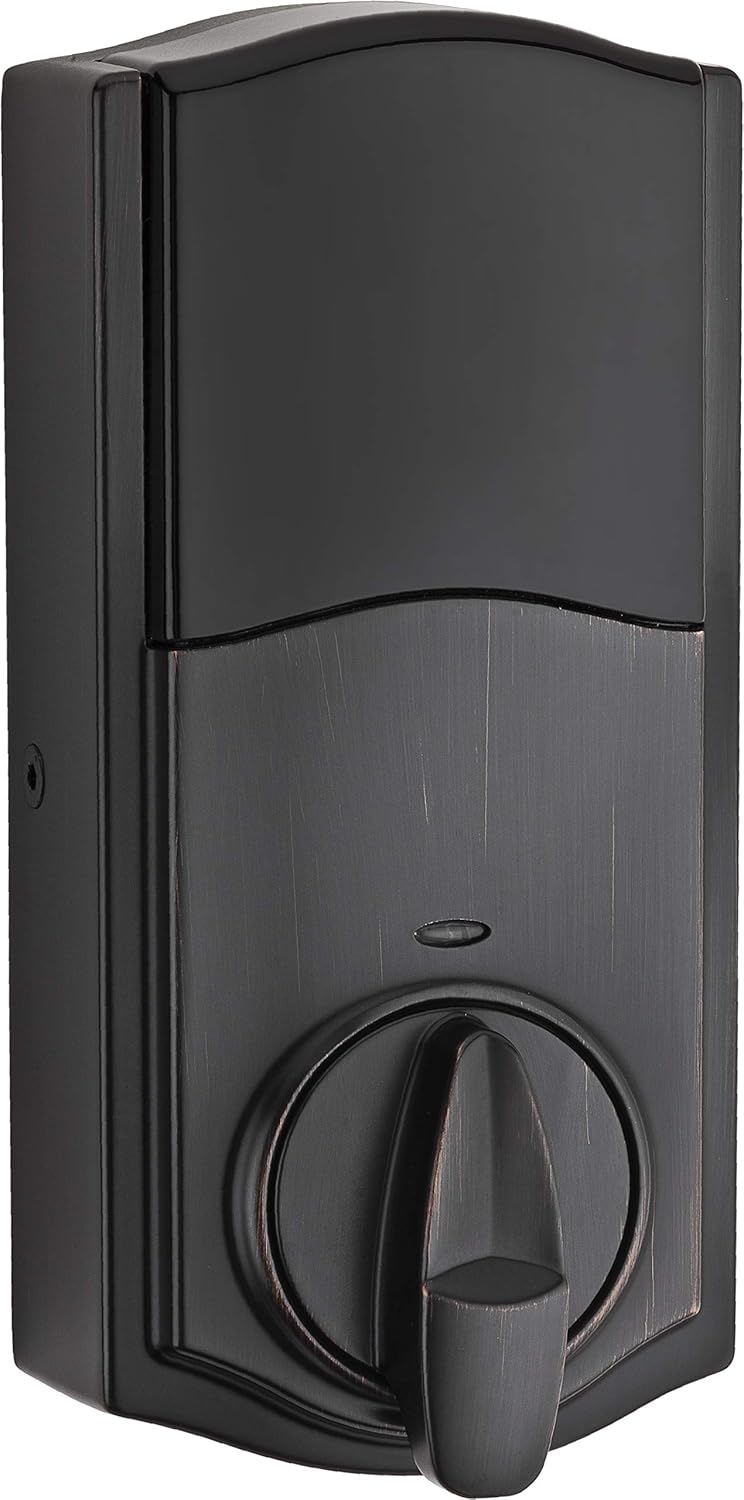
Kwikset 916 Keyless Entry Touchscreen SmartCode Electronic Deadbolt Smart Lock Featuring SmartKey Security and ZigBee 3.0 Technology in Traditional Venetian Bronze, Zigbee Hub Sold Separately

3.80

지난 32시간 동안 판매됨 29

$ 204.80
$ 220.00
-7.42%

I am 71 and female for starters but that doesn't stop me from DIY projects. I like a challenge, and this one was not too bad. As usual the written part of the instructions could be improved a little; I had to count on the pictures a couple of times to see a couple of details like when replacing a kwikset with a kwikset, just compare the lock shaft mechanism probably the same so just leave the old one in if it's not really old which saves a step and if it wears down which it can you have the replacement part. The other advice that cost me time was to be sure to use the screws with a "blunt end" to attach the black unit inside to the outside touch panel, I grabbed the long pointed screws and spent a lot of time figuring out why it wasn't tightening. Be sure to look at the details in the pictures, like making sure the bolt that goes into the door gam is extended when you start. If the instructions were done a bit better it should take maybe 30 minutes to install. The instructions for programming the code were spot on that went easy peasy and I was impressed it worked first time out. I only programmed one code, but there are mutiples you can do plus a master code too, so no one else can make changes which I will do at another time. This is for a monthly vacation rental and I let my guest choose the code they can remember, which they liked a lot. I walked them thru how to lock, use "secure code", which I thought was an awesome added security feature, because it makes sure you have to press 2 other ramdom numbers that display before you can enter your code, so finger prints on numbers can't be seen and copied by someone to gain entry. Much better than cards, or keys as long as it holds up because this is not cheap to replace. Before buying this, I had the standard smart locks and I got locked out after losing my master key. The down side was I had to pay a lock smith guy a lot of money to drill a whole in it to open the door which ruined the lock, but the upside is I like that smart locks can't be "picked" either. This one still integrates that smart lock key technology, but the touch code entry is a game changer. Of course I'm not going to set up anything for remote operation for renters, this is enough bells and whistles. This also eliminates their making duplicate keys and floating around if I don't rekey it, which is also easy on a smart lock, but you have to have another spare notched key to do it with, too. I can also rekey my lower smart key door knob to match this one, so they both use the same key for backup. After programming the code and testing it out, it worked flawlessly. Some people complain about the noise during operation, but for me, it assures me it is working as it should, and it's locked. My renter and I were in awe at how cool it looked and locked without a key. I did have to remind her to manually lock it from the inside when home; it doesn't auto lock, at least I didn't try to see if it had that feature like the model I have at at home does, which is also another Kwitset smart lock only with rubber buttons instead. I thought this one would be more durable for a rental where there is more potential for wear and tear even with it being a 55+, but still, giving them too much technology can become counter productive for me. I won't even install a programmable thermostat either. This was a nice upgrade to my upscale rental and it looks sharp too (shiney brass).Update: BE SURE TO USE ONLY ALKALINE BATTERIES! I installed titanium batteries thinking they would last longer than typical batteries, but I just found out because of intermittent problems with the panel not lighting up, that the cause was the titanium batteries I used. After multiple complaints and trips to the property talking to Kwikset tech support, did I learn this was the issue. No where did I see wording or did any other tech until today tell me to only use Alkaline batteries which is a common issue that causes the lock to fail. I would take the battery compartment out and put it back in and it would work again for a while, then go completely dark so you can lock it unless you use the key. This is true on their other varity of locks like Halo too. I made a stink that this is not stated in bold right on the battery compartment and in the instructions too given that they even state it's a common reason they encounter customer calls their locks are not working. I put 4 Alkaline batteries in now and told this is the fix to my one-year-old Smart lock, but only used for like 6 months out of that time. Another tip, it the lock starts to operate erratic, the you have to remove the back of the unit to get access to those wires you snapped together inside the door hole and unconnected them wait just like rebooting your modem and reconnect them, this will "reboot" and give it a refresh, or call kwikset tech support to walk you through it may require some other things to, so make sure before you take these steps you have all the instructions.Update on the Kwidset 916, I think they have discontinued this model because installing the alkaline battery although it initially seemed to resolve the problem, the next day my rental had the same problem as with the Titaiums. Kwikset support is sending me a new lock now, only it's a 918 model. I asked if the upgraded model was to fix this issue, and they said no. I'm not sure if I will encounter the same problems or not. I'm not sure if a full reset would have fixed it or not, because it's difficult when other people are in there texting it out over time.So far, the Halo model is working out. I lost the Bluetooth connection to the app and don't know why yet.

18 현재 누군가가 웹사이트를 탐색 중입니다.

Color
Polished Chrome Polished Brass Satin Nickel Venetian Bronze
Style
Contemporary Traditional
수량:
- +

예상 배송 시간: 12~26일(국제), 3~6일(미국)

구매일로부터 45일 이내에 반품이 가능합니다. 관세 및 세금은 환불되지 않습니다.

  • ASIN:

    B08VS4C8HP

  • BATTERIES:

    4 AA batteries required. (included)

  • BATTERIES_INCLUDED:

    Yes

  • BATTERIES_REQUIRED:

    Yes

  • BATTERY_CELL_TYPE:

    Alkaline

  • BEST_SELLERS_RANK:

    #157,406 in Tools & Home Improvement (See Top 100 in Tools & Home Improvement) #570 in Deadbolts

  • BRAND:

    Kwikset

  • COLOR:

    Venetian Bronze

  • CONNECTIVITY_PROTOCOL:

    Zigbee

  • CONTROL_METHOD:

    App

  • CONTROLLER_TYPE:

    SmartThings, Wink

  • CUSTOMER_REVIEWS:

    3.8 3.8 out of 5 stars (168) 3.8 out of 5 stars

  • DATE_FIRST_AVAILABLE:

    February 2, 2021

  • FINISH:

    Venetian Bronze

  • FINISH_TYPE:

    Venetian Bronze

  • INCLUDED_COMPONENTS:

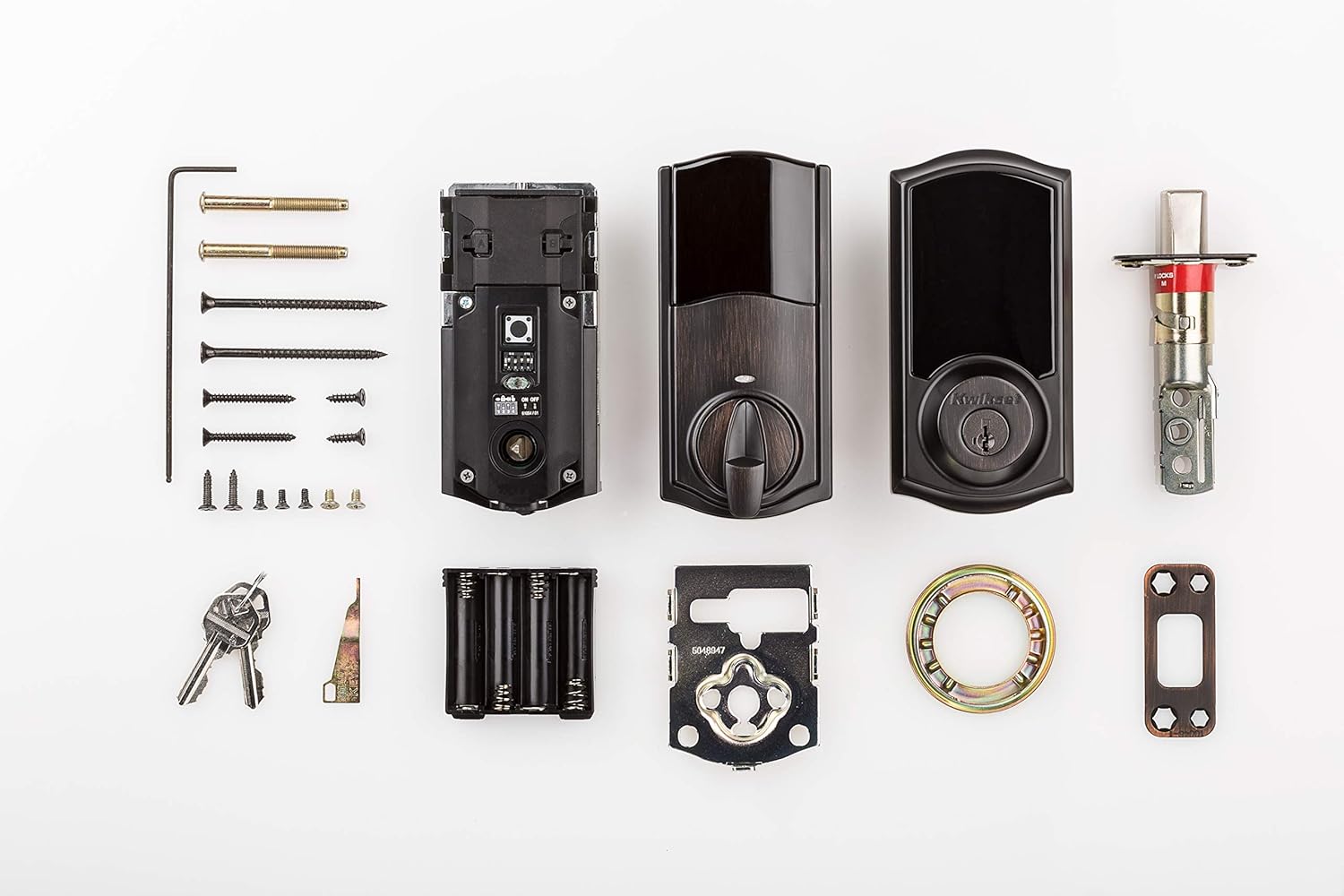
    Electronic Deadbolt, 2 keys, 4 AA batteries

  • ITEM_DIMENSIONS_L_X_W_X_H:

    1.19 x 2.81 x 5.06 inches

  • ITEM_MODEL_NUMBER:

    916TRL TSCR ZB 3.0 11P

  • ITEM_PACKAGE_QUANTITY:

    1

  • ITEM_WEIGHT:

    3.71 pounds

  • LOCK_TYPE:

    Electronic Deadbolt

  • MANUFACTURER:

    Kwikset

  • MATERIAL:

    Metal

  • MODEL_NAME:

    916TRL TSCR ZB 3.0 11P

  • NUMBER_OF_PIECES:

    1

  • PART_NUMBER:

    916TRL TSCR ZB 3.0 11P

  • PRODUCT_DIMENSIONS:

    1.19 x 2.81 x 5.06 inches

  • RECOMMENDED_USES_FOR_PRODUCT:

    Security

  • SHAPE:

    Rectangular

  • SIZE:

    (Pack of 1)

  • SPECIAL_FEATURE:

    Smart Lock,Touchscreen

  • SPECIAL_FEATURES:

    Smart Lock,Touchscreen

  • STYLE:

    Traditional

  • UPC:

    883351760089

안전한 결제를 보장하세요
제품 상세 정보
The SmartCode touchscreen smart lock with Home Connect technology enables the lock to wirelessly communicate with other devices in home. The lock allows the user (through a web enabled device) to remotely check the door lock status, lock or unlock the door and receive notifications. SmartCode is a one-touch locking motorized deadbolt. With your personalized code, you can enter your home with the convenience of keyless entry and the back-lit keypad provides increased visibility. It features patented SecureScreen™ technology to prevent code detection from fingerprints on the touchscreen. SmartCode is easy to install, program and use, and operates on 4 AA batteries. It also features SmartKey Security as the back-up keyway. This single cylinder deadbolt can be locked or unlocked by using the keypad or key from the outside as well as the turn button from the inside.
고객 리뷰
3.80

(100 점수)

5
12
4
8
3
13
2
12
1
55
댓글 취소
댓글을 남겨주세요

14 논평

5.0 out of 5 stars Slick, But!
2026-01-31    -Dee

I am 71 and female for starters but that doesn't stop me from DIY projects. I like a challenge, and this one was not too bad. As usual the written part of the instructions could be improved a little; I had to count on the pictures a couple of times to see a couple of details like when replacing a kwikset with a kwikset, just compare the lock shaft mechanism probably the same so just leave the old one in if it's not really old which saves a step and if it wears down which it can you have the replacement part. The other advice that cost me time was to be sure to use the screws with a "blunt end" to attach the black unit inside to the outside touch panel, I grabbed the long pointed screws and spent a lot of time figuring out why it wasn't tightening. Be sure to look at the details in the pictures, like making sure the bolt that goes into the door gam is extended when you start. If the instructions were done a bit better it should take maybe 30 minutes to install. The instructions for programming the code were spot on that went easy peasy and I was impressed it worked first time out. I only programmed one code, but there are mutiples you can do plus a master code too, so no one else can make changes which I will do at another time. This is for a monthly vacation rental and I let my guest choose the code they can remember, which they liked a lot. I walked them thru how to lock, use "secure code", which I thought was an awesome added security feature, because it makes sure you have to press 2 other ramdom numbers that display before you can enter your code, so finger prints on numbers can't be seen and copied by someone to gain entry. Much better than cards, or keys as long as it holds up because this is not cheap to replace. Before buying this, I had the standard smart locks and I got locked out after losing my master key. The down side was I had to pay a lock smith guy a lot of money to drill a whole in it to open the door which ruined the lock, but the upside is I like that smart locks can't be "picked" either. This one still integrates that smart lock key technology, but the touch code entry is a game changer. Of course I'm not going to set up anything for remote operation for renters, this is enough bells and whistles. This also eliminates their making duplicate keys and floating around if I don't rekey it, which is also easy on a smart lock, but you have to have another spare notched key to do it with, too. I can also rekey my lower smart key door knob to match this one, so they both use the same key for backup. After programming the code and testing it out, it worked flawlessly. Some people complain about the noise during operation, but for me, it assures me it is working as it should, and it's locked. My renter and I were in awe at how cool it looked and locked without a key. I did have to remind her to manually lock it from the inside when home; it doesn't auto lock, at least I didn't try to see if it had that feature like the model I have at at home does, which is also another Kwitset smart lock only with rubber buttons instead. I thought this one would be more durable for a rental where there is more potential for wear and tear even with it being a 55+, but still, giving them too much technology can become counter productive for me. I won't even install a programmable thermostat either. This was a nice upgrade to my upscale rental and it looks sharp too (shiney brass).Update: BE SURE TO USE ONLY ALKALINE BATTERIES! I installed titanium batteries thinking they would last longer than typical batteries, but I just found out because of intermittent problems with the panel not lighting up, that the cause was the titanium batteries I used. After multiple complaints and trips to the property talking to Kwikset tech support, did I learn this was the issue. No where did I see wording or did any other tech until today tell me to only use Alkaline batteries which is a common issue that causes the lock to fail. I would take the battery compartment out and put it back in and it would work again for a while, then go completely dark so you can lock it unless you use the key. This is true on their other varity of locks like Halo too. I made a stink that this is not stated in bold right on the battery compartment and in the instructions too given that they even state it's a common reason they encounter customer calls their locks are not working. I put 4 Alkaline batteries in now and told this is the fix to my one-year-old Smart lock, but only used for like 6 months out of that time. Another tip, it the lock starts to operate erratic, the you have to remove the back of the unit to get access to those wires you snapped together inside the door hole and unconnected them wait just like rebooting your modem and reconnect them, this will "reboot" and give it a refresh, or call kwikset tech support to walk you through it may require some other things to, so make sure before you take these steps you have all the instructions.Update on the Kwidset 916, I think they have discontinued this model because installing the alkaline battery although it initially seemed to resolve the problem, the next day my rental had the same problem as with the Titaiums. Kwikset support is sending me a new lock now, only it's a 918 model. I asked if the upgraded model was to fix this issue, and they said no. I'm not sure if I will encounter the same problems or not. I'm not sure if a full reset would have fixed it or not, because it's difficult when other people are in there texting it out over time.So far, the Halo model is working out. I lost the Bluetooth connection to the app and don't know why yet.

5.0 out of 5 stars Works as expected
2026-01-03    -aceman

It has work as hope for a few years now.

These are noisy and tend to have a touch screen that becomes inoperative occassionaly. You must remove battery pack to reset. It works well with Ring Alarm which is why I have four in our house.

4.0 out of 5 stars Very easy to install
2026-01-23    -Amazon Customer

I love this item

2.0 out of 5 stars Noisy Operation
2026-01-22    -Cohoman

This lock is very well constructed and looks nice. I do like the touchscreen keypad, and it was very easy to install in an existing door. I was able to easily pair this lock using Zigbee to my Home Assistant Hub. What's nice, is that this lock will report locked/unlocked status as well as temperature.However, I did have one big issue with this lock - loudness. When the lock's motor extended and retracted the bolt it make a very loud grinding sound. It sounded like a loud skill saw to me, and my wife thought it sounded like a loud dentist's drill. It was definitely louder than our previous 9-year old Schlage smart lock or all of the locks that we checked out at our local hardware store. Also, the bolt didn't extend or retract very smoothly. It seemed to take considerable effort to do so manually. Finally, the keypad display stopped working after 1 day, so I had to return it as defective.

5.0 out of 5 stars Works as expected
2026-02-24    -aceman

It has work as hope for a few years now.

1.0 out of 5 stars Continuous issues
2026-02-06    -Alyce B.

First off, the lock arrived with expired batteries which I didn’t notice until it was installed. I had to remove the cover to replace the batteries and then it started operating incorrectly. It continuously beeps randomly and the key pad continues to light up with either the X pattern, two digits or the entire key pad flashes. I tried all the troubleshooting tips to no avail. Finally, I spoke with the Kwikset customer service techs but they could not resolve the problem. They are going to send me a new lock. I hope I have better luck with the new one. If not, I’ll ask for a full refund. I would not recommend purchasing this lock.

2.0 out of 5 stars Noisy Operation
2026-02-05    -Cohoman

This lock is very well constructed and looks nice. I do like the touchscreen keypad, and it was very easy to install in an existing door. I was able to easily pair this lock using Zigbee to my Home Assistant Hub. What's nice, is that this lock will report locked/unlocked status as well as temperature.However, I did have one big issue with this lock - loudness. When the lock's motor extended and retracted the bolt it make a very loud grinding sound. It sounded like a loud skill saw to me, and my wife thought it sounded like a loud dentist's drill. It was definitely louder than our previous 9-year old Schlage smart lock or all of the locks that we checked out at our local hardware store. Also, the bolt didn't extend or retract very smoothly. It seemed to take considerable effort to do so manually. Finally, the keypad display stopped working after 1 day, so I had to return it as defective.

1.0 out of 5 stars Continuous issues
2026-01-03    -Alyce B.

First off, the lock arrived with expired batteries which I didn’t notice until it was installed. I had to remove the cover to replace the batteries and then it started operating incorrectly. It continuously beeps randomly and the key pad continues to light up with either the X pattern, two digits or the entire key pad flashes. I tried all the troubleshooting tips to no avail. Finally, I spoke with the Kwikset customer service techs but they could not resolve the problem. They are going to send me a new lock. I hope I have better luck with the new one. If not, I’ll ask for a full refund. I would not recommend purchasing this lock.

5.0 out of 5 stars Slick, But!
2026-01-26    -Dee

I am 71 and female for starters but that doesn't stop me from DIY projects. I like a challenge, and this one was not too bad. As usual the written part of the instructions could be improved a little; I had to count on the pictures a couple of times to see a couple of details like when replacing a kwikset with a kwikset, just compare the lock shaft mechanism probably the same so just leave the old one in if it's not really old which saves a step and if it wears down which it can you have the replacement part. The other advice that cost me time was to be sure to use the screws with a "blunt end" to attach the black unit inside to the outside touch panel, I grabbed the long pointed screws and spent a lot of time figuring out why it wasn't tightening. Be sure to look at the details in the pictures, like making sure the bolt that goes into the door gam is extended when you start. If the instructions were done a bit better it should take maybe 30 minutes to install. The instructions for programming the code were spot on that went easy peasy and I was impressed it worked first time out. I only programmed one code, but there are mutiples you can do plus a master code too, so no one else can make changes which I will do at another time. This is for a monthly vacation rental and I let my guest choose the code they can remember, which they liked a lot. I walked them thru how to lock, use "secure code", which I thought was an awesome added security feature, because it makes sure you have to press 2 other ramdom numbers that display before you can enter your code, so finger prints on numbers can't be seen and copied by someone to gain entry. Much better than cards, or keys as long as it holds up because this is not cheap to replace. Before buying this, I had the standard smart locks and I got locked out after losing my master key. The down side was I had to pay a lock smith guy a lot of money to drill a whole in it to open the door which ruined the lock, but the upside is I like that smart locks can't be "picked" either. This one still integrates that smart lock key technology, but the touch code entry is a game changer. Of course I'm not going to set up anything for remote operation for renters, this is enough bells and whistles. This also eliminates their making duplicate keys and floating around if I don't rekey it, which is also easy on a smart lock, but you have to have another spare notched key to do it with, too. I can also rekey my lower smart key door knob to match this one, so they both use the same key for backup. After programming the code and testing it out, it worked flawlessly. Some people complain about the noise during operation, but for me, it assures me it is working as it should, and it's locked. My renter and I were in awe at how cool it looked and locked without a key. I did have to remind her to manually lock it from the inside when home; it doesn't auto lock, at least I didn't try to see if it had that feature like the model I have at at home does, which is also another Kwitset smart lock only with rubber buttons instead. I thought this one would be more durable for a rental where there is more potential for wear and tear even with it being a 55+, but still, giving them too much technology can become counter productive for me. I won't even install a programmable thermostat either. This was a nice upgrade to my upscale rental and it looks sharp too (shiney brass).Update: BE SURE TO USE ONLY ALKALINE BATTERIES! I installed titanium batteries thinking they would last longer than typical batteries, but I just found out because of intermittent problems with the panel not lighting up, that the cause was the titanium batteries I used. After multiple complaints and trips to the property talking to Kwikset tech support, did I learn this was the issue. No where did I see wording or did any other tech until today tell me to only use Alkaline batteries which is a common issue that causes the lock to fail. I would take the battery compartment out and put it back in and it would work again for a while, then go completely dark so you can lock it unless you use the key. This is true on their other varity of locks like Halo too. I made a stink that this is not stated in bold right on the battery compartment and in the instructions too given that they even state it's a common reason they encounter customer calls their locks are not working. I put 4 Alkaline batteries in now and told this is the fix to my one-year-old Smart lock, but only used for like 6 months out of that time. Another tip, it the lock starts to operate erratic, the you have to remove the back of the unit to get access to those wires you snapped together inside the door hole and unconnected them wait just like rebooting your modem and reconnect them, this will "reboot" and give it a refresh, or call kwikset tech support to walk you through it may require some other things to, so make sure before you take these steps you have all the instructions.Update on the Kwidset 916, I think they have discontinued this model because installing the alkaline battery although it initially seemed to resolve the problem, the next day my rental had the same problem as with the Titaiums. Kwikset support is sending me a new lock now, only it's a 918 model. I asked if the upgraded model was to fix this issue, and they said no. I'm not sure if I will encounter the same problems or not. I'm not sure if a full reset would have fixed it or not, because it's difficult when other people are in there texting it out over time.So far, the Halo model is working out. I lost the Bluetooth connection to the app and don't know why yet.

댓글을 남겨주세요:

댓글 제목
댓글 내용
배송 및 반품
우리가 당신을 보호하겠습니다

대부분 지역에서는 배송비를 한 번만 지불하시면 됩니다 (주문 및 배송 페이지를 확인해 주세요).

구매 후 14일 이내 무료 반품 가능 (단, 수명이 다한 제품, 맞춤 제작 상품, 마스크, 향수 및 에어로졸과 같이 위험하거나 인화성 물질이 포함된 일부 제품은 제외).

수입 관세 정보

복잡한 절차는 저희가 처리해 드리겠습니다. 카나리아 제도를 제외한 모든 EU 국가, 영국, 미국, 캐나다, 호주, 뉴질랜드, 푸에르토리코, 스위스, 싱가포르, 한국, 쿠웨이트, 멕시코, 카타르, 인도, 노르웨이, 사우디아라비아, 대만, 태국, UAE, 일본, 브라질, 맨섬, 산마리노, 콜롬비아, 칠레, 아르헨티나, 이집트, 레바논, 홍콩 특별행정구, 바레인, 터키로 배송되는 상품 가격에는 모든 수입 관세가 포함되어 있습니다. 표시된 가격이 최종 결제 금액입니다.

예상 배송 시간

특급 배송: 7-10일

해당 창고에서 배송되었습니다.

더 자세한 정보가 필요하신가요?
반품 정책
반품 정책

저희는 제품 품질에 자신 있습니다. 만약 구매하신 제품에 완전히 만족하지 못하신다면, 수령일로부터 30일 이내에 간편하게 반품하실 수 있도록 정책을 마련해 두었습니다.

간편한 교환 또는 환불
  • 다른 사이즈, 색상 또는 스타일의 상품으로 교환하거나 전액 환불받을 수 있습니다.
  • 반품되는 모든 상품은 착용하지 않은 상태여야 하며, 원래 포장 상태 그대로 모든 태그가 손상되지 않은 상태여야 합니다.
간단한 절차
  • 온라인으로 반품을 신청하거나 고객 서비스 팀에 문의하여 도움을 받으실 수 있습니다.
  • 물품을 제대로 포장해 주시고, 원래의 포장 목록도 함께 넣어주세요.
  • 반품하실 상품을 보내주실 때에는 저희가 제공해 드린 선불 배송 라벨을 사용해 주시기 바랍니다.
  • 환불 요청 접수 즉시 처리해 드리겠습니다.

반품과 관련하여 궁금한 점이나 우려 사항이 있으시면 언제든지 저희 전문 고객 서비스 팀에 문의해 주세요. 고객 만족은 저희의 최우선 목표입니다.

범주
차이
제품
모든 제품 지우기