고객 서비스

판매자들은 가입하면 더 많은 혜택을 누릴 수 있습니다.

모든 주문 무료 배송.

스마트 홈 조명

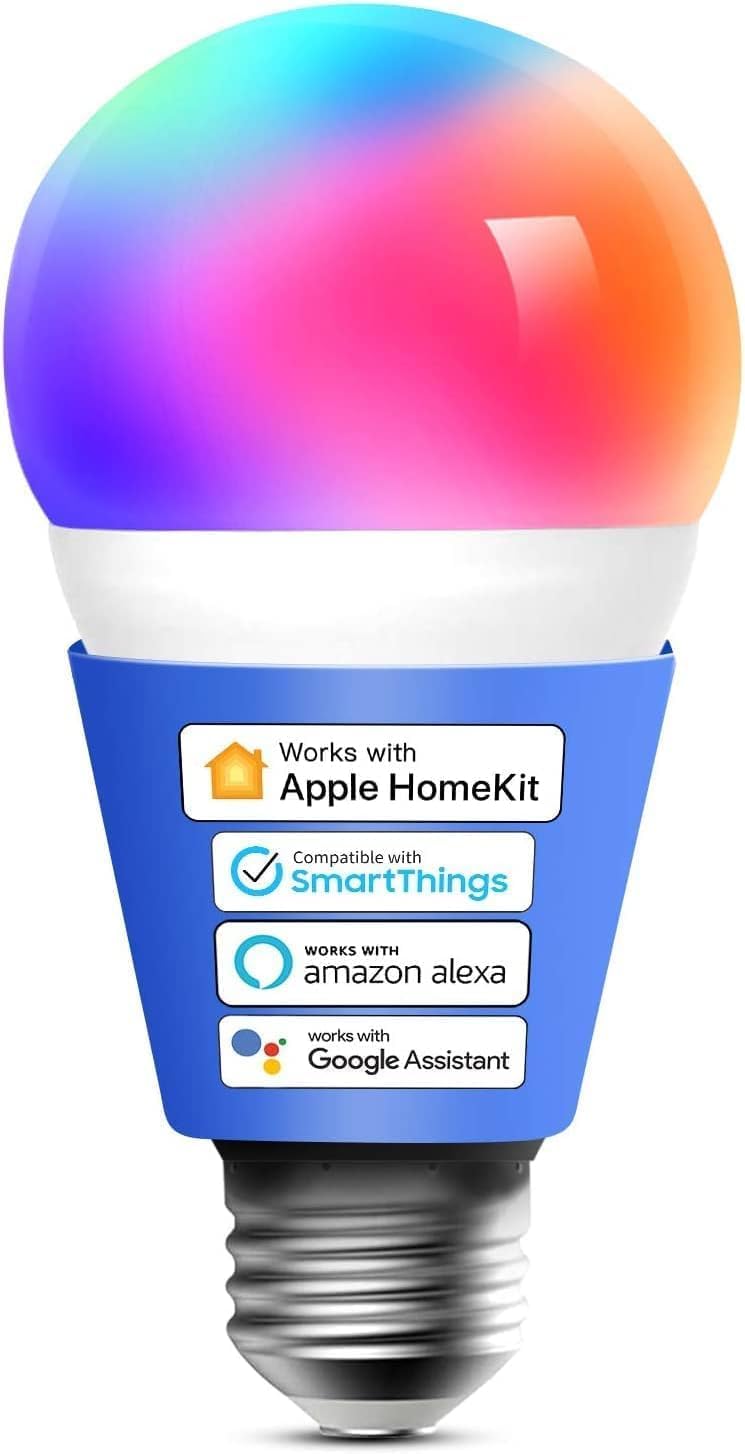
meross Smart LED Light Bulb, Smart WiFi LED Bulbs Compatible with Apple HomeKit, Siri, Alexa,Google Home & SmartThings, Dimmable E26 Multicolor 2700K-6500K RGBWW, 900 Lumens 60W Equivalent, 1 Pack

4.10

지난 32시간 동안 판매됨 41

$ 15.26
$ 15.00
--1.70%

I bought this as a quick/cheap/dirty notification light to use with SmartThings (a door open indicator, for example). It worked well for that purpose, though there was some quirkiness in choosing brightness levels from within the SmartThings app: you couldn't change the brightness level in any form using automated control, specifically.In the new version of SmartThings (1.7), a lot of functionality with this bulb has been broken. Using any automated control (scenes, automations both) you can only turn the bulb on or off, cannot change color, brightness level, color temperature, etc. If you manually set any of the options (from within direct control in SmartThings), it'll 'default' to that setting. So, for example, if you manually adjust the brightness to 1%, any automations - regardless of their brightness setting - will turn the bulb on to 1%. No automations or scenes can change the color or color temperature, as well.Additionally, some specific colors will throw up "a network or server error occurred" and not change the color at all.Keep in mind, I think these are probably functionality problems within SmartThings, not with the bulb itself or the meross app or services. The bulb itself is the best budget RGB smart bulb I've ever used, and highly recommend it for typical usage.

20 현재 누군가가 웹사이트를 탐색 중입니다.

Style
BR30 1 Pack 2 Pack 1 Pack
수량:
- +

예상 배송 시간: 12~26일(국제), 3~6일(미국)

구매일로부터 45일 이내에 반품이 가능합니다. 관세 및 세금은 환불되지 않습니다.

  • ACCEPTED_VOLTAGE_FREQUENCY:

    100 to 120 Volts and 60 Hertz

  • ASIN:

    B08HPVNS8T

  • AVERAGE_LIFE:

    22.8 Years

  • BATTERIES_INCLUDED:

    No

  • BATTERIES_REQUIRED:

    No

  • BEAM_ANGLE:

    180 Degrees

  • BEST_SELLERS_RANK:

    #60,074 in Industrial & Scientific (See Top 100 in Industrial & Scientific) #3,435 in LED Bulbs

  • BRAND:

    meross

  • BRIGHTNESS:

    810 Lumen

  • BULB_BASE:

    E26

  • BULB_SHAPE_SIZE:

    A19

  • COLOR:

    Multicolor

  • COLOR_RENDERING_INDEX:

    80

  • COLOR_TEMPERATURE:

    6500 Kelvin

  • CONTROL_METHOD:

    App, Voice

  • CUSTOMER_REVIEWS:

    4.1 4.1 out of 5 stars (870) 4.1 out of 5 stars

  • DATE_FIRST_AVAILABLE:

    April 15, 2020

  • EFFICIENCY:

    High Efficiency

  • INCANDESCENT_EQUIVALENT_WATTAGE:

    60 Watts

  • INCLUDED_COMPONENTS:

    User Guide

  • INDOOR_OUTDOOR_USAGE:

    Indoor

  • ITEM_MODEL_NUMBER:

    G3 TP120-9/A19 WIFI RGBCW OMNI M

  • ITEM_PACKAGE_QUANTITY:

    1

  • ITEM_WEIGHT:

    3.2 ounces

  • LIGHT_COLOR:

    Multicolor

  • LIGHT_OUTPUT_MAXIMUM:

    810 Lumens

  • LIGHT_SOURCE_TYPE:

    LED

  • LIGHT_SOURCE_WATTAGE:

    9 Watts

  • LIGHT_TYPE:

    LED

  • MANUFACTURER:

    Meross

  • MATERIAL:

    Aluminum, Plastic

  • MODEL_NAME:

    G3 TP120-9/A19 WiFi RGBCW OMNI M

  • NUMBER_OF_ITEMS:

    1

  • PART_NUMBER:

    MSL120HK

  • POWER_CONSUMPTION:

    9 Watts

  • POWER_SOURCE:

    Corded Electric

  • PRODUCT_DIMENSIONS:

    2.4"W x 4.5"H

  • SHAPE:

    E26

  • SIZE:

    1 Count (Pack of 1)

  • SPECIAL_FEATURE:

    Works with Apple HomeKit,Siri, Alexa, Echo, Nest Hub and SmartThings, WiFi Smart Bulb, Dimmable, RGBWW, 2700K-6500K, Party Color Change Bulb, App Remote Control,Timer Schedule, Sunlight, Sunrise, Sunset, DIY mode, Scene mode, Energy Saving, No Hub Required

  • SPECIAL_FEATURES:

    Works with Apple HomeKit,Siri, Alexa, Echo, Nest Hub and SmartThings, WiFi Smart Bulb, Dimmable, RGBWW, 2700K-6500K, Party Color Change Bulb, App Remote Control,Timer Schedule, Sunlight, Sunrise, Sunset, DIY mode, Scene mode, Energy Saving, No Hub Required

  • SPECIFIC_USES_FOR_PRODUCT:

    Appliance

  • SPECIFICATION_MET:

    FCC, UL

  • STYLE:

    1 Pack

  • UNIT_COUNT:

    1.0 Count

  • UPC:

    600358067306

  • VOLTAGE:

    120 Volts

  • WARRANTY_DESCRIPTION:

    1 year.

  • WATTAGE:

    9 watts

  • WHITE_BRIGHTNESS:

    810 Lumens

안전한 결제를 보장하세요

제품 상세 정보
Swipe to Learn More At Meross, we create products that empower people's lives. We believe in making homes smarter and people's lives easier. We believe everyone deserves a smart life, and it should be simple, smart, and stable. Can't pair HomeKit? Not compatible with 5g wifi 1. Reboot your device to clear the Apple Home app’s cache. 2. Follow the user manual to reset and Power cycle the accessory. 3. Ensure that you have a dedicated 2.4GHz Wi-Fi until the setup is successful. Why do the bulbs keep disconnecting? 1. Make sure your Wi-Fi is set to 2.4GHz, not 5GHz. Reset the bulbs and router if needed. 2. Temporarily change your Wi-Fi encryption to WPA2, do not use WPA3 only. 3. Create a new home in the Home app and use it to set up the accessory. Energy Monitoring Plug Smart Light Switch Smart Light Bulbs Smart Bulbs 4 Pack Br30 Smart Bulbs 2 Pack Dimmable Wi-Fi LED Bulb Smart Bulbs 4 Pack
고객 리뷰
4.10

(100 점수)

5
11
4
4
3
8
2
14
1
63
댓글 취소
댓글을 남겨주세요

20 논평

Somewhat Lacking
2026-02-22    -RMc

Not sure yet whether I like this bulb. Color & brightness can not be programmed/linked so they must be controlled separately.It would be nice, for example, to change from one color/brightness to another with the push of a single button. A couple of “Favorite” buttons would make that easy. Instead, you must select the color then brightness while watching the light. So much for automation.Also, although color temperatures can be edited, they seem to return to a default state if switched away from then back.Meross products work really well with Apple HomeKit, which is why they are my #1 pick but, I feel this particular device is lacking.I’m hoping the issue will be fixed with a firmware update in the not-too-distant future. For now, however, I likely won’t buy another one of these bulbs.Additional Update: The bulb seems to have issues staying connected to Apple HomeKit. No issues staying connected to the Meross app however. That said, in most every case, the latter has to be used to control the bulb.

SETUP:I use Apple Homekit for most of our smart devices. Within Homekit, setup was relatively easy, once I worked past a limitation of my router. We have a Google Wifi mesh router and there is no way to “switch off” the 5.0 gHz radio. The Meross devices, including this bulb, will only attach to a 2.4 gHz network. Many routers, you can go in and switch the 5gig system off, and this would allow setup to be a breeze. For me, I have to unplug all of my Google points (pucks) except for the main one, get as far away from the main router as possible and refresh the wifi signal on my phone until my phone attaches itself to the 2.4gig network. 5gHz wifi does not pass through walls or other objects as well as 2.4 does so the further you get from the router, the better chance of attaching to the 2.4gig signal. Once I did that, the bulb appeared as a new device in my Apple Home app. I then plugged in the 8-digit code and the bulb was added to my “Home.” After this was done, I added the bulb to my Meross app as well. This way you can do any firmware upgrades and such. Apple Home app does not let you do any of this.THE LOOK:My first reaction to full brightness was slight disappointment. I have the bulb in a table lamp and wish it was a bit brighter for reading and such. That said, for many applications, I think the brightness would be sufficient. The bulb seems to have limitless color options. The Home app and the Meross app give you two different scales in order to adjust the color labeled “Color” and “Temperature.” If you know about lighting, this is kind of weird because ALL color has a temperature. However with this bulb, the “color” setting gives you access to a color palette of what I call “party lights.” Reds, blues, green, etc. The “Temperature” setting basically allows you to setup the bulb between the colors often labeled as “daylight” or “soft white” if you are trying to match this bulb to existing light in the room. I was able to get it to match the bluish daylight coming through the window in the 5000k range as well as the more orange temperature, 3000k-3500k of some conventional light bulbs in the room. I just kind of wish these 2 setting were combined into 1. I think it would be easier to setup.USE:The bulb responds to the Home and Meross apps well, although I think the Meross app allows for faster, more consistent adjustment. The Home app seems a little more sluggish when making changes. It doesn’t always update the graphics when the bulb changes. For instance, if the light is colored white, sometimes the graphic shows it to be red. I suspect this is just how Homekit works and might work better with firmware updates in the bulb. I feel like Homekit is more for making specific programs, or “scenes” of multiple connected devices and automating them rather than making real-time changes to your devices. The Meross app is very snappy when making real-time adjustments. You can also use the Meross app to create “scenes” and “routines” (their terminology for automations) although I didn’t test any of this since I use Homekit.As I said, I put this in a table lamp. After testing this bulb thoroughly, I removed the bulb and replaced the standard soft white LED bulb that was originally in the lamp. It is a 3-way bulb that gets far brighter. The Meross bulbs works well, but not in this location.My only true “deal breaker” with this bulb is if you turn the lamp off at the switch, it comes back on in the last known state. For instance, if the light is set for a red color at 50% brightness, that is how it will come on if the lamp is turned off conventionally at the switch. This may be fine for some, but for me I do not want to have to go find my phone to turn the light on and off all the time. If I have the light very low while watching TV, turn it off at the switch to go to bed, and my wife turns it on the next night, I want it to come on full bright immediately so it is usable right away. For many, this is likely not a big deal, but in our home it is. We have a 4-bulb lamp in our home office (different brand of bulbs) where my wife has the 4 bulbs facing different directions and has them programmed differently for different times of the day (i.e. sunrise, full sun, dusk, clouds, etc.) to reduce reflections on her computer monitors. When leaving the office for the evening, she simply shuts off the wall switch. In the morning, she can just turn on the switch and all 4 lights come on full and she can adjust from there. I would really like to see this functionality in a smart bulb that is to be used for primary lighting. I think this would be a good bulb to use as an “accent” light somewhere, or in a kid’s room, or as a novelty but I really don’t have any practical use for it as a primary light source.PROS:Easy setup (unless you have a Google mesh router)Infinite color optionsInexpensiveApple Homekit compatibleMeross app easy to useCONS:Wakes up in last known state if power switch is turned offBulb could be brighterWish the “color” and “temperature” tabs were combined into one in the appsApple Home app is a bit sluggish when controlling the bulb (may be Homekit issue, not necessarily a Meross issue)

no issues. have purchased multiple of these lights over the past few years. always work well. great for Homekit smart homes.

My life has become easier with these lightbulbs! Comfy in bed but you know you left the lamp on? Go on the Meross app and tap the off button! I love the way you can dim or brighten, have fun colors that set the mood or just different shades of white tones! I have repurchased and now have 4 of these in my home! Love it and easy to use app as well

Easy to setup and use
2026-02-01    -Simon Tang

Pleasantly surprised so simple to setup. You don’t even need a smart plug! The Meross Smart Wi-Fi plug I also ordered is used for a different device. Bulb is bright for the bedroom and I can adjust colour and brightness with Siri. Need some trial and error to find out iOS 14 Siri does not allow scheduling commands like “Turn off bedroom light in 2 minutes” but iPadOS 15 work flawlessly. Overall great product at good price.

Somewhat Lacking
2026-02-20    -RMc

Not sure yet whether I like this bulb. Color & brightness can not be programmed/linked so they must be controlled separately.It would be nice, for example, to change from one color/brightness to another with the push of a single button. A couple of “Favorite” buttons would make that easy. Instead, you must select the color then brightness while watching the light. So much for automation.Also, although color temperatures can be edited, they seem to return to a default state if switched away from then back.Meross products work really well with Apple HomeKit, which is why they are my #1 pick but, I feel this particular device is lacking.I’m hoping the issue will be fixed with a firmware update in the not-too-distant future. For now, however, I likely won’t buy another one of these bulbs.Additional Update: The bulb seems to have issues staying connected to Apple HomeKit. No issues staying connected to the Meross app however. That said, in most every case, the latter has to be used to control the bulb.

no issues. have purchased multiple of these lights over the past few years. always work well. great for Homekit smart homes.

This product broke after a few months as it started flashing from white to yellow and the case came off as the glue ripped. Don't recommend.

This product broke after a few months as it started flashing from white to yellow and the case came off as the glue ripped. Don't recommend.

1.0 out of 5 stars Updated: Subpar compared to other bulbs
2025-12-24    -Charles Francis Xavier

Updated: After living with the Nanoleaf A19 bulbs for almost two months, the Meross is an even bigger disappointment. The colors are just WEIRD. I have it over the kitchen sink and even with a “warm white” setting, food colors are clearly strange and unnatural! Definitely planning to replace it at this point.Combined with the limited color palette - and the superior alternatives available elsewhere - this bulb is a terrible “value” for any purpose.*For tech nerds: It seems that the pulse-width-modulation used for blending colors is a very slow rate, so the LED colors don’t blend properly.Just awful.- -Original review: This was my first HomeKit purchase since it was on sale. Setup was easy and it connected to my HomeKit network - but the color range is pathetic (no vivid blues or greens just beige/white/red) and overall it’s dim.Just bought the Nanoleaf Thread bulbs and they’re so much better for colors, brightness, and HomeKit integration.This Meross bulb ended up over the kitchen sink. It’ll do.

댓글을 남겨주세요:

댓글 제목
댓글 내용
배송 및 반품
우리가 당신을 보호하겠습니다

대부분 지역에서는 배송비를 한 번만 지불하시면 됩니다 (주문 및 배송 페이지를 확인해 주세요).

구매 후 14일 이내 무료 반품 가능 (단, 수명이 다한 제품, 맞춤 제작 상품, 마스크, 향수 및 에어로졸과 같이 위험하거나 인화성 물질이 포함된 일부 제품은 제외).

수입 관세 정보

복잡한 절차는 저희가 처리해 드리겠습니다. 카나리아 제도를 제외한 모든 EU 국가, 영국, 미국, 캐나다, 호주, 뉴질랜드, 푸에르토리코, 스위스, 싱가포르, 한국, 쿠웨이트, 멕시코, 카타르, 인도, 노르웨이, 사우디아라비아, 대만, 태국, UAE, 일본, 브라질, 맨섬, 산마리노, 콜롬비아, 칠레, 아르헨티나, 이집트, 레바논, 홍콩 특별행정구, 바레인, 터키로 배송되는 상품 가격에는 모든 수입 관세가 포함되어 있습니다. 표시된 가격이 최종 결제 금액입니다.

예상 배송 시간

특급 배송: 7-10일

해당 창고에서 배송되었습니다.

더 자세한 정보가 필요하신가요?
반품 정책
반품 정책

저희는 제품 품질에 자신 있습니다. 만약 구매하신 제품에 완전히 만족하지 못하신다면, 수령일로부터 30일 이내에 간편하게 반품하실 수 있도록 정책을 마련해 두었습니다.

간편한 교환 또는 환불
  • 다른 사이즈, 색상 또는 스타일의 상품으로 교환하거나 전액 환불받을 수 있습니다.
  • 반품되는 모든 상품은 착용하지 않은 상태여야 하며, 원래 포장 상태 그대로 모든 태그가 손상되지 않은 상태여야 합니다.
간단한 절차
  • 온라인으로 반품을 신청하거나 고객 서비스 팀에 문의하여 도움을 받으실 수 있습니다.
  • 물품을 제대로 포장해 주시고, 원래의 포장 목록도 함께 넣어주세요.
  • 반품하실 상품을 보내주실 때에는 저희가 제공해 드린 선불 배송 라벨을 사용해 주시기 바랍니다.
  • 환불 요청 접수 즉시 처리해 드리겠습니다.

반품과 관련하여 궁금한 점이나 우려 사항이 있으시면 언제든지 저희 전문 고객 서비스 팀에 문의해 주세요. 고객 만족은 저희의 최우선 목표입니다.

범주
차이
제품
모든 제품 지우기