

인쇄기
KODAK Dock Plus 4PASS Instant Photo Printer, 4x6” Portable Picture Printer, Bluetooth & Dock 2-in-1 Home and Gift Printer for iPhone & Android, 50 Sheets Bundle
4.20
지난 32시간 동안 판매됨 20
$ 139.99
$ 149.00
-6.44%
Absolutely loved it! Definitely worth the money! The pictures come out the same as taken no color distortion! Super easy to setup and get started! I love the Bluetooth feature the app is super easy to set up and use! Made scrapbooking a lot easier!
11 현재 누군가가 웹사이트를 탐색 중입니다.
수량:
-
+
예상 배송 시간: 12~26일(국제), 3~6일(미국)
구매일로부터 45일 이내에 반품이 가능합니다. 관세 및 세금은 환불되지 않습니다.
-
ADDITIONAL_PRINTER_FUNCTIONS:
Print Only
-
ASIN:
B088PRX3BD
-
BATTERIES:
1 D batteries required. (included)
-
BEST_SELLERS_RANK:
#617 in Office Products (See Top 100 in Office Products) #2 in Desktop Photo Printers
-
COLOR_DEPTH:
36 bpp
-
COMPATIBLE_DEVICES:
KODAK 4PASS CARTRIDGE (ICRG-260), ICRG-360, ICRG-4120, PHC-80
-
CONTROL_METHOD:
App
-
CONTROLLER_TYPE:
Android, iOS
-
CUSTOMER_REVIEWS:
4.2 4.2 out of 5 stars (19,652) 4.2 out of 5 stars
-
DATE_FIRST_AVAILABLE:
May 16, 2020
-
DEPARTMENT:
All Ages
-
DUAL_SIDED_PRINTING:
Yes
-
DUPLEX:
simplex
-
GLOBAL_TRADE_IDENTIFICATION_NUMBER:
00192143002628
-
HARDWARE_INTERFACE:
USB Type C
-
INCLUDED_COMPONENTS:
IPhone Lightning Adaptor, Initial Cartridge, Photo Papers, Power Adapter,, User Manual
-
INK_COLOR:
Yellow, Magenta, Cyan, Black
-
IS_DISCONTINUED_BY_MANUFACTURER:
No
-
ITEM_MODEL_NUMBER:
CAR-PD460Y
-
ITEM_WEIGHT:
4.4 pounds
-
MANUFACTURER:
Prinics Co., Ltd.
-
MAX_COPY_RESOLUTION_BLACK_WHITE:
1200 dpi
-
MAX_COPY_RESOLUTION_COLOR:
1200 x 1200
-
MAX_COPY_SPEED_BLACK_WHITE:
1 ppm
-
MAX_INPUT_SHEET_CAPACITY:
20
-
MAXIMUM_BLACK_AND_WHITE_PRINT_RESOLUTION:
300 dots_per_inch
-
MAXIMUM_COLOR_PRINT_RESOLUTION:
300 Dots Per Inch
-
MAXIMUM_COPIES_PER_RUN:
1
-
MAXIMUM_MEDIA_SIZE:
4x6 inches
-
MEMORY_STORAGE_CAPACITY:
64 MB
-
MODEL_SERIES:
Kodak Dock Plus
-
NUMBER_OF_TRAYS:
1
-
NUMBER_OF_USB_2_PORTS:
1
-
OUTPUT_SHEET_CAPACITY:
50
-
PRINT_MEDIA:
Glossy photo paper
-
PRINTER_INK_TYPE:
Solid dye-sublimation ink
-
PRODUCT_DIMENSIONS:
4"D x 7"W x 3"H
-
SCANNER_TYPE:
Portable
-
SHEET_SIZE:
4x6 Inches
-
SPECIFIC_USES_FOR_PRODUCT:
Home, School
-
SUPPORTED_MEDIA_SIZES:
4 x 6 inches
-
TOTAL_USB_PORTS:
1
-
UPC:
192143002628
-
WARRANTY_TYPE:
Limited Warranty
안전한 결제를 보장하세요






제품 상세 정보
Swipe to See More →
Extraordinary value with a price lower than others and 7 times more photos for your money!
We'll tell you how to replace the cartridge!
Open the cartridge door on the side of the printer.
Remove the old cartridge and insert the new one, aligning it with the correct shape. (Press above ‘PULL’ for easy removal.)
Push the cartridge in until you hear a “click” sound.
What photo paper and cartridge should be used for the Kodak Dock Plus printer?
Official Kodak photo paper and cartridge (PHC-80) must be used for the Kodak Dock Plus photo printer, which can be found on Amazon.
What's included in the package?
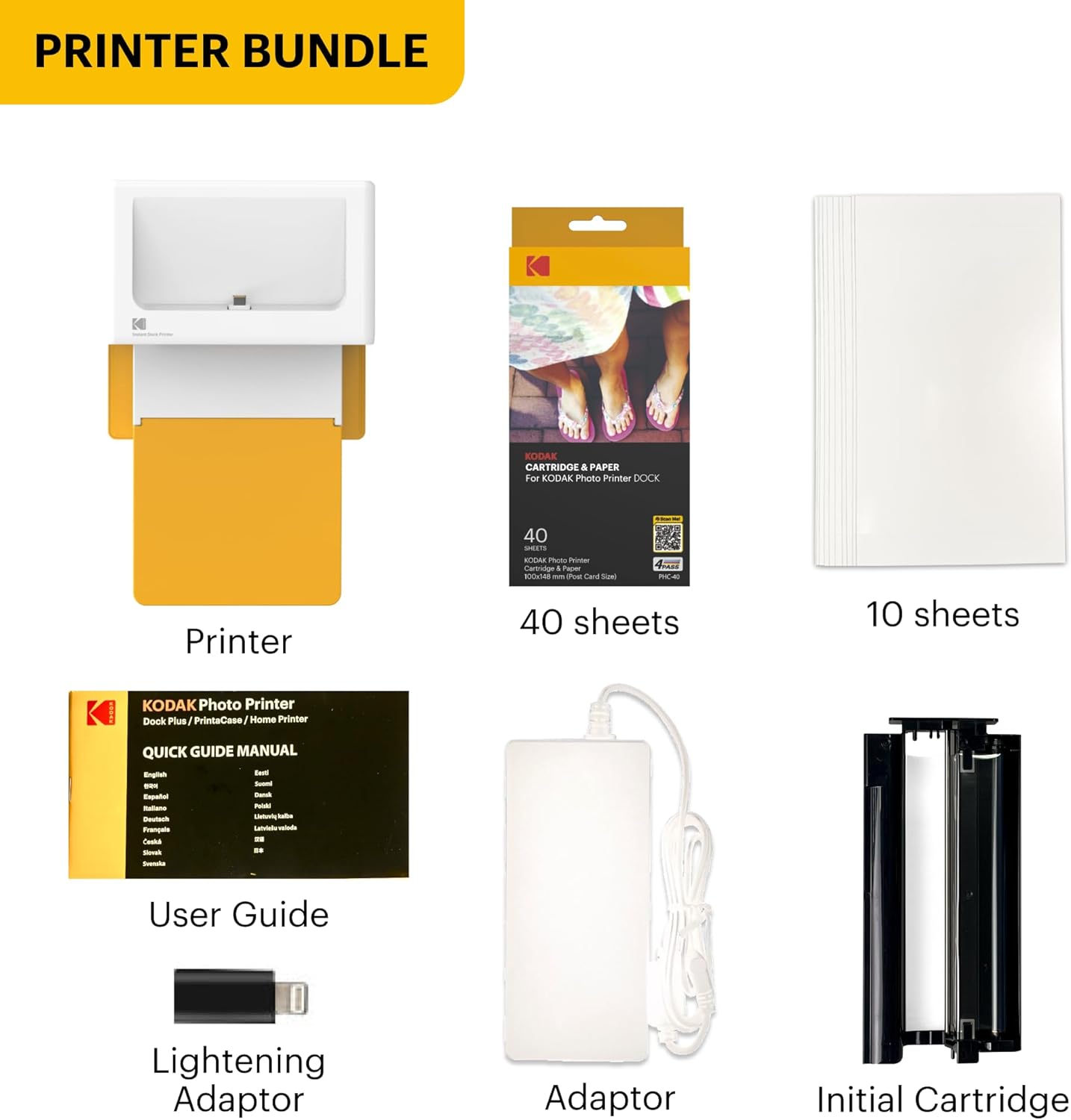
- All products come with a photo printer with user manual, power adapter, iPhone Lightning adaptor, initial cartridge and 10 photo papers.
- All bundles come with additional 40 sheets of photo paper and cartridge.
What can you do with the Kodak Photo Printer App?
With the free Kodak Photo Printer App, you can create frames and make many edits on your photos.
How can I download Kodak Photo Printer app?
Search and download 'Kodak Photo Printer' App on Google Play or App Store.
What should I do if there is an issue with the product?
Please do not hesitate to contact support regarding your product and we will do everything we can to help you solve the issue.
KODAK 4x6 Photo Printer
Instant Camera & Printer
Photo Sticker Printer
KODAK Label Maker
Portable Photo Printer
고객 리뷰
4.20
(100 점수)
댓글 취소
댓글을 남겨주세요

배송 및 반품
우리가 당신을 보호하겠습니다
대부분 지역에서는 배송비를 한 번만 지불하시면 됩니다 (주문 및 배송 페이지를 확인해 주세요).
구매 후 14일 이내 무료 반품 가능 (단, 수명이 다한 제품, 맞춤 제작 상품, 마스크, 향수 및 에어로졸과 같이 위험하거나 인화성 물질이 포함된 일부 제품은 제외).
수입 관세 정보
복잡한 절차는 저희가 처리해 드리겠습니다. 카나리아 제도를 제외한 모든 EU 국가, 영국, 미국, 캐나다, 호주, 뉴질랜드, 푸에르토리코, 스위스, 싱가포르, 한국, 쿠웨이트, 멕시코, 카타르, 인도, 노르웨이, 사우디아라비아, 대만, 태국, UAE, 일본, 브라질, 맨섬, 산마리노, 콜롬비아, 칠레, 아르헨티나, 이집트, 레바논, 홍콩 특별행정구, 바레인, 터키로 배송되는 상품 가격에는 모든 수입 관세가 포함되어 있습니다. 표시된 가격이 최종 결제 금액입니다.
예상 배송 시간
특급 배송: 7-10일
해당 창고에서 배송되었습니다.
반품 정책
반품 정책
저희는 제품 품질에 자신 있습니다. 만약 구매하신 제품에 완전히 만족하지 못하신다면, 수령일로부터 30일 이내에 간편하게 반품하실 수 있도록 정책을 마련해 두었습니다.
간편한 교환 또는 환불
- 다른 사이즈, 색상 또는 스타일의 상품으로 교환하거나 전액 환불받을 수 있습니다.
- 반품되는 모든 상품은 착용하지 않은 상태여야 하며, 원래 포장 상태 그대로 모든 태그가 손상되지 않은 상태여야 합니다.
간단한 절차
- 온라인으로 반품을 신청하거나 고객 서비스 팀에 문의하여 도움을 받으실 수 있습니다.
- 물품을 제대로 포장해 주시고, 원래의 포장 목록도 함께 넣어주세요.
- 반품하실 상품을 보내주실 때에는 저희가 제공해 드린 선불 배송 라벨을 사용해 주시기 바랍니다.
- 환불 요청 접수 즉시 처리해 드리겠습니다.
반품과 관련하여 궁금한 점이나 우려 사항이 있으시면 언제든지 저희 전문 고객 서비스 팀에 문의해 주세요. 고객 만족은 저희의 최우선 목표입니다.