

무선 오디오
Wireless HDMI 2 Receiver and Transmitter USB-C Extender Kit,Plug & Play 165FT Portable 2.4G/5G Wirelessly Simultaneous Expansion for Multiple Screens from Laptop and Camera to TVs,Projectors
4.40
지난 32시간 동안 판매됨 43
$ 169.99
$ 180.00
-5.89%
This was so easy to install and works exactly as advertised. At our church we have need for one input to be wirelessly transmitted to four receivers. Plugs in to HDMI connectors and power plugs in to USB slots on receivers and computer. Excellent value for the cost.
16 현재 누군가가 웹사이트를 탐색 중입니다.
수량:
-
+
예상 배송 시간: 12~26일(국제), 3~6일(미국)
구매일로부터 45일 이내에 반품이 가능합니다. 관세 및 세금은 환불되지 않습니다.
-
ASIN:
B0DQTWTB2J
-
BEST_SELLERS_RANK:
#110,455 in Electronics (See Top 100 in Electronics) #520 in Wireless Audio Receivers & Adapters
-
BRAND_NAME:
LIULANZ
-
CUSTOMER_REVIEWS:
4.4 4.4 out of 5 stars (71) 4.4 out of 5 stars
-
DATE_FIRST_AVAILABLE:
December 18, 2024
-
ITEM_MODEL_NUMBER:
G59
-
ITEM_WEIGHT:
14 ounces
-
PRODUCT_DIMENSIONS:
6.8 x 3.4 x 1 inches
-
SPECIAL_FEATURES:
165FT/50M Wireless Tranmission, HD Movie Experience 5G/2.4G Dual-Band, Multiple Screens Expand Simultaneously, Plug & Play,Support USB-C/Type-C, Support iOS/Android Phone/Tablets
안전한 결제를 보장하세요






제품 상세 정보
LIULANZ is a brand established in 2017, we love life and are focusing on designing and developing everything that is convenient and useful. We are always striving to the way of providing more products full of high creativity and new ideas.
LIULANZ does its best to developing high-quality products for customers, and wholeheartedly provides customers with the best after-sales service.
We believe technology can make our life better!
We have established a strict quality control standards, each product undergoes multiple quality inspections to ensure it is qualified. We are doing everything we can to improve the entire experience of owning our products.
If you accidentally receive defective products, or have any questions when using, feel free to let us know, and we will provide solutions in 24h.
24H professional support
30 days return and exchange service
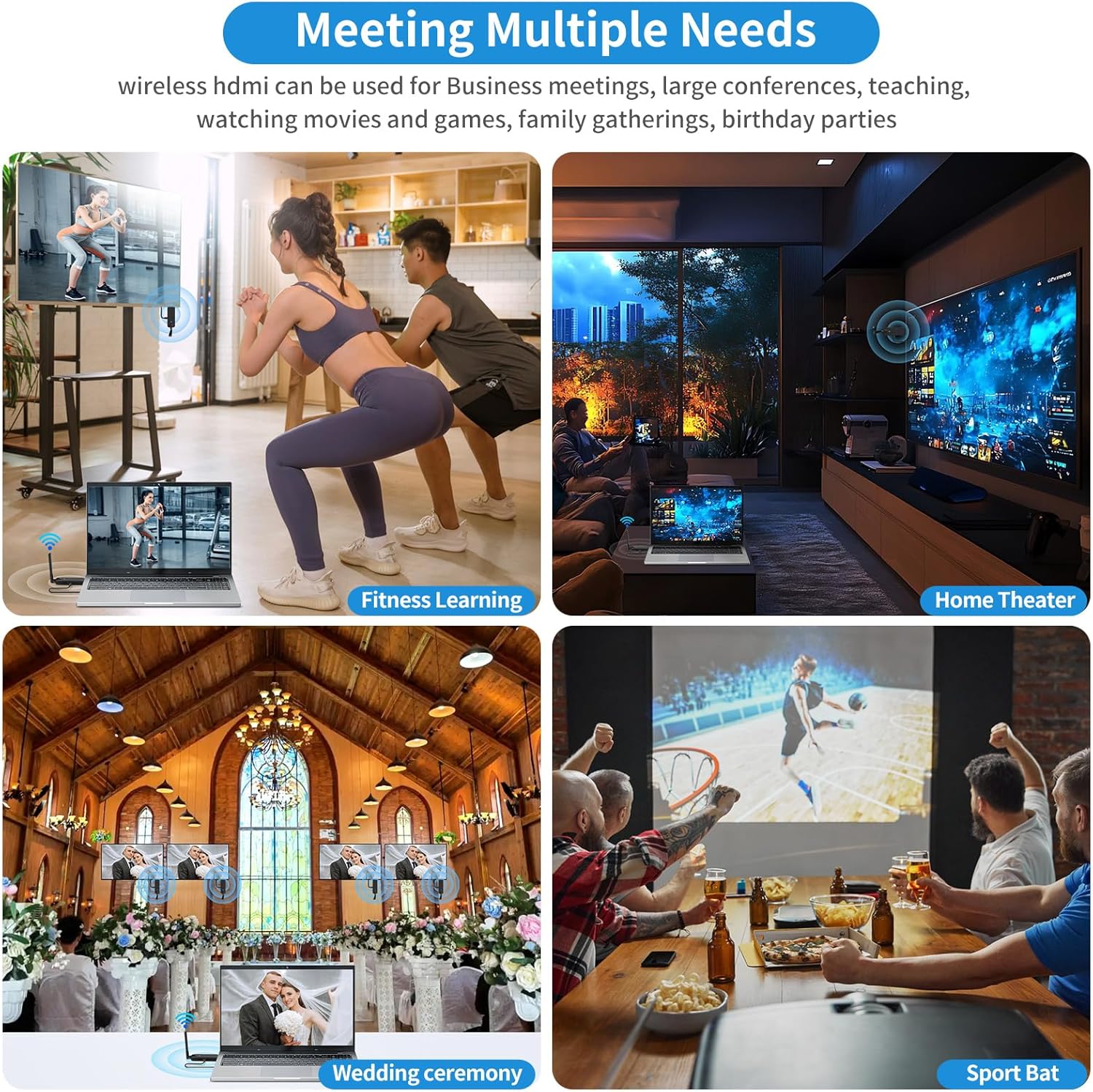
This Ultra-Long-Range stable splitter can realize multi-TV multi-room sharing, the fun of movies is no longer limited to the living room, you can watch movies wherever you want.
This multi-TV transmitter throws the small screen to the big screen, and you can follow the lessons, making the movement more standard and easy.
This HDMI wireless dongle no cable, no software driver, no Bluetooth connection. During the World Cup, it will be a good choice for bars, where the fun of the game can be easily enjoyed in two steps.
The HDMI wireless dongle for TV using 2.4GHz and 5GHz dual-band Wi-Fi,only ultra-low 0.1s latency.Suitable for places such as churches and weddings that require the installation of monitors.
Use this HDMI wireless adapter to sync your shots, so you can view photos from your computer at any time, no need to view photos through the camera, more convenient.
1.How do use phone and iPad as screens:Download the "TuTuPlay" application, search WiFi "TuTuLink XXXX", enter the password "12345678", and return to the "TuTuPlay" application after the connection is completed.
2.The HDMI wireless transmitter and receiver utilize a 5V/2A power supply for stable connectivity.Power cables must be connected to both transmitter and receiver to ensure stable power supply, otherwise the device will be disconnected or unavailable.
3.Screen matching suggestions:2 fixed displays +4 mobile displays or 4 fixed displays +2 mobile displays.
4.The HDMI wireless receiver and transmitter surface is marked with TX and RX,TX (transmitter) is for Laptop, Camera, Cable Box and so on, while RX (receiver) is for display connection.Please be sure to distinguish the transmitter (TX) and receiver (RX) before hooking it up.
5.The long range HDMI wireless transmitter and receiver,delivering a 165FT/50M Long Transmission Range in Open Environments (No Barriers).
With 5G Technology Support, it can transmit through walls or ceilings, covering about 32 FT (10 Meters).
1.Re-pair:The HDMI wireless adapter has been paired before delivery.If the pairing fails due to improper operation or other reasons during use, re-pair the device.The steps are as follows:
a. Long press the receiver(RX) function key for more than 3 seconds, a pairing prompt appears, and the receiver indicator quickly flashes into pairing mode.
b. Long press the transmitter(TX) function key for more than 3 seconds, and the indicator flashes rapidly for pairing. Wait for the indicator to be steady on, indicating that the connection is successful.
2.Overheating: TX and RX devices emit heat during operation.This generated heat falls within controllable limits and is considered a typical occurrence.If overheating occurs, disconnect the device from HDMI, let it cool, then reconnect.
3.Unplug and Plug: Re-insert electronic devices if issues arise. Sometimes electronic devices may encounter problems that can be resolved by resetting the Unplug TX and RX for a while, then Plug Back again.
4.HDMI Interface Maintenance: Regular checks and reinsertion can resolve connection issues caused by prolonged use of the HDMI interface on devices such as TVs and laptops phone.
5.Unplug and Plug: Re-insert electronic devices if issues arise. Sometimes electronic devices may encounter problems that can be resolved by resetting the Unplug TX and RX for a while, then Plug Back again.
고객 리뷰
4.40
(100 점수)
댓글 취소
댓글을 남겨주세요

배송 및 반품
우리가 당신을 보호하겠습니다
대부분 지역에서는 배송비를 한 번만 지불하시면 됩니다 (주문 및 배송 페이지를 확인해 주세요).
구매 후 14일 이내 무료 반품 가능 (단, 수명이 다한 제품, 맞춤 제작 상품, 마스크, 향수 및 에어로졸과 같이 위험하거나 인화성 물질이 포함된 일부 제품은 제외).
수입 관세 정보
복잡한 절차는 저희가 처리해 드리겠습니다. 카나리아 제도를 제외한 모든 EU 국가, 영국, 미국, 캐나다, 호주, 뉴질랜드, 푸에르토리코, 스위스, 싱가포르, 한국, 쿠웨이트, 멕시코, 카타르, 인도, 노르웨이, 사우디아라비아, 대만, 태국, UAE, 일본, 브라질, 맨섬, 산마리노, 콜롬비아, 칠레, 아르헨티나, 이집트, 레바논, 홍콩 특별행정구, 바레인, 터키로 배송되는 상품 가격에는 모든 수입 관세가 포함되어 있습니다. 표시된 가격이 최종 결제 금액입니다.
예상 배송 시간
특급 배송: 7-10일
해당 창고에서 배송되었습니다.
반품 정책
반품 정책
저희는 제품 품질에 자신 있습니다. 만약 구매하신 제품에 완전히 만족하지 못하신다면, 수령일로부터 30일 이내에 간편하게 반품하실 수 있도록 정책을 마련해 두었습니다.
간편한 교환 또는 환불
- 다른 사이즈, 색상 또는 스타일의 상품으로 교환하거나 전액 환불받을 수 있습니다.
- 반품되는 모든 상품은 착용하지 않은 상태여야 하며, 원래 포장 상태 그대로 모든 태그가 손상되지 않은 상태여야 합니다.
간단한 절차
- 온라인으로 반품을 신청하거나 고객 서비스 팀에 문의하여 도움을 받으실 수 있습니다.
- 물품을 제대로 포장해 주시고, 원래의 포장 목록도 함께 넣어주세요.
- 반품하실 상품을 보내주실 때에는 저희가 제공해 드린 선불 배송 라벨을 사용해 주시기 바랍니다.
- 환불 요청 접수 즉시 처리해 드리겠습니다.
반품과 관련하여 궁금한 점이나 우려 사항이 있으시면 언제든지 저희 전문 고객 서비스 팀에 문의해 주세요. 고객 만족은 저희의 최우선 목표입니다.