고객 서비스

판매자들은 가입하면 더 많은 혜택을 누릴 수 있습니다.

모든 주문 무료 배송.

입력 장치

Wacom Techno Cintiq 21UX 21-Inch Interactive Pen Display PC Tablet With Pen and Software

3.90

지난 32시간 동안 판매됨 47

$ 429.00
$ 465.00
-8.39%

This was a purchase I thought about for a long time, not sure if I would use it to full advantage. I'm still not sure I will, but it's a beautiful new toy/working tool, and now that I've had it for a month, I wouldn't want to be without it.I'm a digital artist, and I already had an Intuos3 tablet for a couple of years, which I adore. It sits on the keyboard ledge beside my led lit gamers' keyboard (I don't play games; I just like that it's lit and doesn't have the number keypad). I needed to replace my old CRT monitor, and after much looking decided to go for this Cintiq.I've only got one issue at this point: When the Intuos3 is directly in line with the Cintiq, the mouse jitters badly. Move the Intuos a foot to either side, and there's no problem. On the night when the Cintiq arrived, I called tech support (who BTW, was very patient, knowledgeable, friendly, and spoke perfect American English) to help me with the setup, and he said once I got my workspace configured the way I wanted it, I could call back, and they'd try to resolve the jitter issue.So for now, the Cintiq sits above the keyboard, smaller LCD to the right, and Intuos3 on a little table to the right of my chair. When I use PhotoShop, Painter, etc., my canvas is on the Cintiq, and the controls are on the other LCD screen. I'm still relying on the Intuos3 mostly for painting with my pens (I have 2 Grip pens because one came with each tablet, a Classic pen which I bought because of its small barrel that fits well in my small hand, and the Art pen), but in areas that call for precise brush strokes, I lean forward and paint directly onto the Cintiq. The brush behaves just a tad differently on each of the two tablets, so occasionally I'll need to reset the brush parameters, but maybe that's just me. I'm still trying to decide what kind of workspace setup I need to best utilize all my tools, but as far as the Cintiq goes, it's responsive and even clearer than my other monitor. Once it was synchronized with the pens, there's no problem whatsoever with brushes in relation to the canvas, but then I'm used to using a tablet as my mouse pad for everything, including browsing the net, and I think not being used to a tablet may be the problem for some who try the Cintiq. I'd like to have it laid flatter and placed like Jeremy Sutton's with the Cintiq on a low table so that I can use it more like an actual canvas, but I might have to give up some of my other elements, so we'll see how things evolve.I gave it 5 stars because the Cintiq is everything it's supposed to be, and any issues relate to my personal setup and preferences.

22 현재 누군가가 웹사이트를 탐색 중입니다.

수량:
- +

예상 배송 시간: 12~26일(국제), 3~6일(미국)

구매일로부터 45일 이내에 반품이 가능합니다. 관세 및 세금은 환불되지 않습니다.

  • ASIN:

    B000P32M3U

  • BEST_SELLERS_RANK:

    #1,043 in Computer Graphics Tablets #1,692 in Computer Touch Pads

  • CUSTOMER_REVIEWS:

    3.9 3.9 out of 5 stars (37) 3.9 out of 5 stars

  • DATE_FIRST_AVAILABLE:

    June 17, 2003

  • IS_DISCONTINUED_BY_MANUFACTURER:

    No

  • ITEM_MODEL_NUMBER:

    CINTIQ21UX

  • ITEM_WEIGHT:

    22.4 pounds

  • LANGUAGE:

    English

  • MANUFACTURER:

    Wacom, Inc

  • PRODUCT_DIMENSIONS:

    22.5 x 10.75 x 28 inches

안전한 결제를 보장하세요

제품 상세 정보
Wacom Techno Cintiq 21UX 21-Inch Interactive Pen Display PC Tablet With Pen and Software
고객 리뷰
3.90

(100 점수)

5
15
4
0
3
16
2
16
1
53
댓글 취소
댓글을 남겨주세요

6 논평

5.0 out of 5 stars Cintiq in a dual monitor setup
2026-02-25    -Packrat Tendencies

This was a purchase I thought about for a long time, not sure if I would use it to full advantage. I'm still not sure I will, but it's a beautiful new toy/working tool, and now that I've had it for a month, I wouldn't want to be without it.I'm a digital artist, and I already had an Intuos3 tablet for a couple of years, which I adore. It sits on the keyboard ledge beside my led lit gamers' keyboard (I don't play games; I just like that it's lit and doesn't have the number keypad). I needed to replace my old CRT monitor, and after much looking decided to go for this Cintiq.I've only got one issue at this point: When the Intuos3 is directly in line with the Cintiq, the mouse jitters badly. Move the Intuos a foot to either side, and there's no problem. On the night when the Cintiq arrived, I called tech support (who BTW, was very patient, knowledgeable, friendly, and spoke perfect American English) to help me with the setup, and he said once I got my workspace configured the way I wanted it, I could call back, and they'd try to resolve the jitter issue.So for now, the Cintiq sits above the keyboard, smaller LCD to the right, and Intuos3 on a little table to the right of my chair. When I use PhotoShop, Painter, etc., my canvas is on the Cintiq, and the controls are on the other LCD screen. I'm still relying on the Intuos3 mostly for painting with my pens (I have 2 Grip pens because one came with each tablet, a Classic pen which I bought because of its small barrel that fits well in my small hand, and the Art pen), but in areas that call for precise brush strokes, I lean forward and paint directly onto the Cintiq. The brush behaves just a tad differently on each of the two tablets, so occasionally I'll need to reset the brush parameters, but maybe that's just me. I'm still trying to decide what kind of workspace setup I need to best utilize all my tools, but as far as the Cintiq goes, it's responsive and even clearer than my other monitor. Once it was synchronized with the pens, there's no problem whatsoever with brushes in relation to the canvas, but then I'm used to using a tablet as my mouse pad for everything, including browsing the net, and I think not being used to a tablet may be the problem for some who try the Cintiq. I'd like to have it laid flatter and placed like Jeremy Sutton's with the Cintiq on a low table so that I can use it more like an actual canvas, but I might have to give up some of my other elements, so we'll see how things evolve.I gave it 5 stars because the Cintiq is everything it's supposed to be, and any issues relate to my personal setup and preferences.

The cintiq is a cool piece of technology, but it has one very noticeable flaw that I was not able to accept. When I would draw, the lines would all have a wave to them. I'm not talking about the standard digital jitter. I can draw smoothly on my intuos tablet, but the cintiq seems to have some shielding problems that will not allow for smooth drawing. People have argued that, that's just the price of digital drawing, but in my opinion something that costs $2,000 should work better than that. If it was half the price, I probably would've kept it and been happy with it, but that's a lot of money for it not to work as I expect it to. If you google cintiq jitter, or wavy lines you may be able to find others with similar problems. I ended up returning it after spending a week trying to get wacom to help me.By the way, wacom tech support is nice up to the point where they don't have an answer for you. Then they just ignore you. That's when I realized my problem is a limitation of the technology or it's a defect they don't want to admit is occurring.There was also a delay in my actions and what occurred on screen. Once you get drawing, you don't really notice it though.On the plus side, beautiful screen, big drawing area, really fun to draw on, and I loved being able to rotate the screen. Like I said, if it was half the cost, I would've kept it.For the money, I'd recommend getting a tablet pc instead of a cintiq. From what I've read tablet pc's have less jitter problems, are half the cost, and you get an entire computer instead of just a monitor.

5.0 out of 5 stars excellent
2026-02-18    -Marcelo Ferreira Mendes

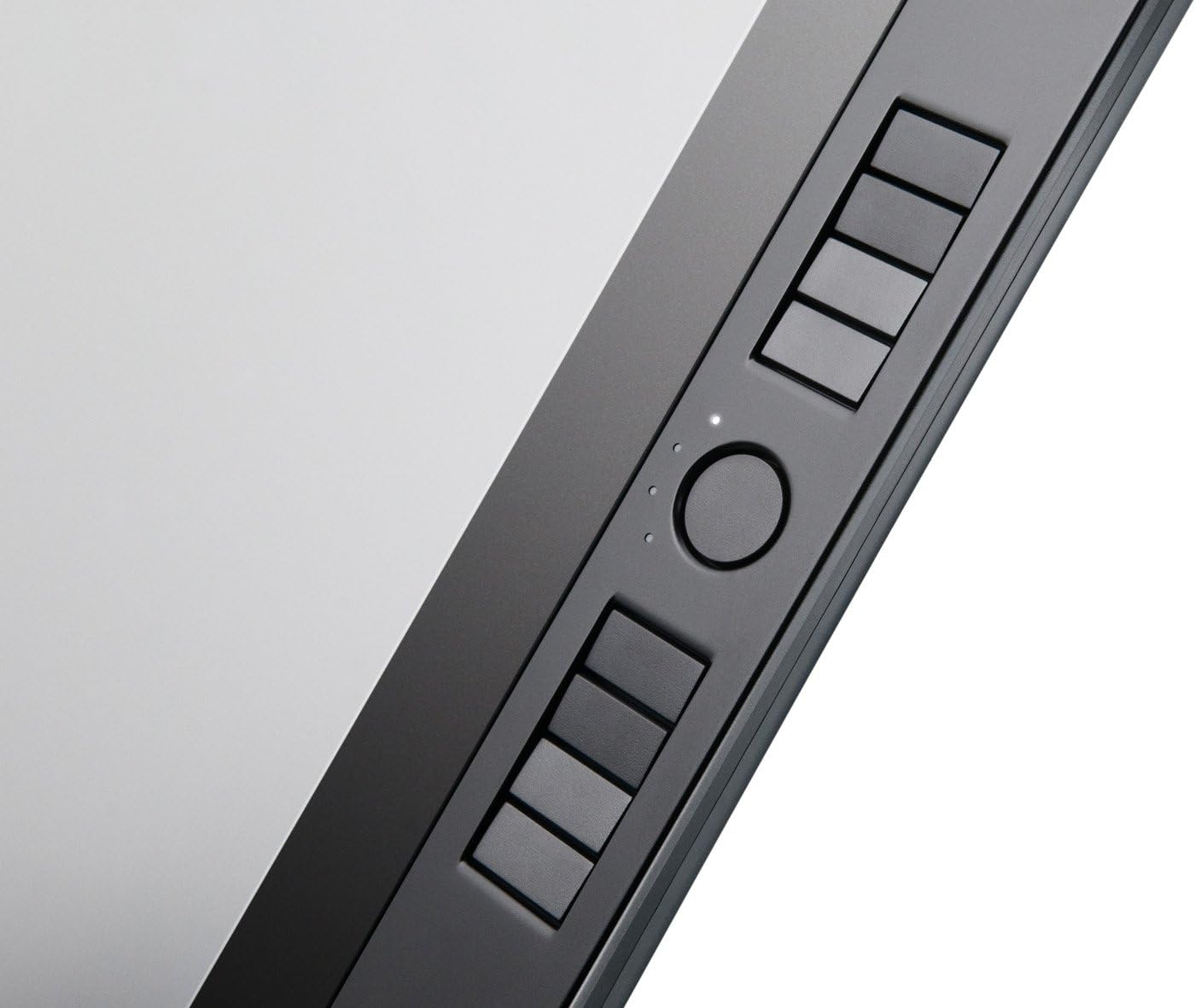
This item is perfect for anyone who has the drive for art and the spare bucks! The cintiq 21 ux is a BEAST of a tablet, I did not expect it to be this heavy either.The features on the cintiq are roughly the same as on most wacom tablets, a zoom scroller and a few macro buttons and I found it real nice that wacom thought about all you left handers out there by putting the macros on both sides of the cintiq, either side can also be disabled just incase you like to spread your arms while you work. The pen works just like the rest to except for the high levels of pressure sensitivity. If your working with the cintiq stand included in the box you have the ability to rotate the screen to an extent and it is not at all hard to push. Aside from rotating you can tilt the screen to a few different levels from flat to straight up, which is good to swap when your working or for displaying work to others. Theres 2 pen holders in this package, one which is the standard ink well type holder and one which is cleverly put in the back of the cintiq, it's not a huge deal but it helps if your desk to have less stuff on it or something.This cintiq will also double in as a VERY good screen. It handles 1920x1080 resolutions which is terrific for space. All that and the pen is very responsive, however I had one issue but I'm not sure if its software based or if its the cintiqs fault, sometimes when I brush up the function of the pen gets locked and the mouse pointer drags to that direction, this has not happend to me alot but I have seen it.The screen itself feels sooo smooth as if it was sanded down with something and does not in ANY way feel like that slippery hard plastic you get on wacom graphires(I never used intuos so your going to have to ask someone else for comparisons.The only issue I have is that sometimes the screen forces 1600x1200 resolution, I don't know it could be an issue with my graphics card.So overall this is an amazing top of the line product with the only downside of it being so expensive. So if you want that feel of doing drawings or paints just the way you do on paper or canvas for your digital work, I highly suggest you start saving cash for a cintiq! :D or buy it now If you can afford it :P Wacom Techno Cintiq 21UX 21-Inch Interactive Pen Display PC Tablet With Pen and Software

The cintiq is a cool piece of technology, but it has one very noticeable flaw that I was not able to accept. When I would draw, the lines would all have a wave to them. I'm not talking about the standard digital jitter. I can draw smoothly on my intuos tablet, but the cintiq seems to have some shielding problems that will not allow for smooth drawing. People have argued that, that's just the price of digital drawing, but in my opinion something that costs $2,000 should work better than that. If it was half the price, I probably would've kept it and been happy with it, but that's a lot of money for it not to work as I expect it to. If you google cintiq jitter, or wavy lines you may be able to find others with similar problems. I ended up returning it after spending a week trying to get wacom to help me.By the way, wacom tech support is nice up to the point where they don't have an answer for you. Then they just ignore you. That's when I realized my problem is a limitation of the technology or it's a defect they don't want to admit is occurring.There was also a delay in my actions and what occurred on screen. Once you get drawing, you don't really notice it though.On the plus side, beautiful screen, big drawing area, really fun to draw on, and I loved being able to rotate the screen. Like I said, if it was half the cost, I would've kept it.For the money, I'd recommend getting a tablet pc instead of a cintiq. From what I've read tablet pc's have less jitter problems, are half the cost, and you get an entire computer instead of just a monitor.

5.0 out of 5 stars excellent
2026-01-13    -Marcelo Ferreira Mendes

This item is perfect for anyone who has the drive for art and the spare bucks! The cintiq 21 ux is a BEAST of a tablet, I did not expect it to be this heavy either.The features on the cintiq are roughly the same as on most wacom tablets, a zoom scroller and a few macro buttons and I found it real nice that wacom thought about all you left handers out there by putting the macros on both sides of the cintiq, either side can also be disabled just incase you like to spread your arms while you work. The pen works just like the rest to except for the high levels of pressure sensitivity. If your working with the cintiq stand included in the box you have the ability to rotate the screen to an extent and it is not at all hard to push. Aside from rotating you can tilt the screen to a few different levels from flat to straight up, which is good to swap when your working or for displaying work to others. Theres 2 pen holders in this package, one which is the standard ink well type holder and one which is cleverly put in the back of the cintiq, it's not a huge deal but it helps if your desk to have less stuff on it or something.This cintiq will also double in as a VERY good screen. It handles 1920x1080 resolutions which is terrific for space. All that and the pen is very responsive, however I had one issue but I'm not sure if its software based or if its the cintiqs fault, sometimes when I brush up the function of the pen gets locked and the mouse pointer drags to that direction, this has not happend to me alot but I have seen it.The screen itself feels sooo smooth as if it was sanded down with something and does not in ANY way feel like that slippery hard plastic you get on wacom graphires(I never used intuos so your going to have to ask someone else for comparisons.The only issue I have is that sometimes the screen forces 1600x1200 resolution, I don't know it could be an issue with my graphics card.So overall this is an amazing top of the line product with the only downside of it being so expensive. So if you want that feel of doing drawings or paints just the way you do on paper or canvas for your digital work, I highly suggest you start saving cash for a cintiq! :D or buy it now If you can afford it :P Wacom Techno Cintiq 21UX 21-Inch Interactive Pen Display PC Tablet With Pen and Software

5.0 out of 5 stars Cintiq in a dual monitor setup
2026-02-21    -Packrat Tendencies

This was a purchase I thought about for a long time, not sure if I would use it to full advantage. I'm still not sure I will, but it's a beautiful new toy/working tool, and now that I've had it for a month, I wouldn't want to be without it.I'm a digital artist, and I already had an Intuos3 tablet for a couple of years, which I adore. It sits on the keyboard ledge beside my led lit gamers' keyboard (I don't play games; I just like that it's lit and doesn't have the number keypad). I needed to replace my old CRT monitor, and after much looking decided to go for this Cintiq.I've only got one issue at this point: When the Intuos3 is directly in line with the Cintiq, the mouse jitters badly. Move the Intuos a foot to either side, and there's no problem. On the night when the Cintiq arrived, I called tech support (who BTW, was very patient, knowledgeable, friendly, and spoke perfect American English) to help me with the setup, and he said once I got my workspace configured the way I wanted it, I could call back, and they'd try to resolve the jitter issue.So for now, the Cintiq sits above the keyboard, smaller LCD to the right, and Intuos3 on a little table to the right of my chair. When I use PhotoShop, Painter, etc., my canvas is on the Cintiq, and the controls are on the other LCD screen. I'm still relying on the Intuos3 mostly for painting with my pens (I have 2 Grip pens because one came with each tablet, a Classic pen which I bought because of its small barrel that fits well in my small hand, and the Art pen), but in areas that call for precise brush strokes, I lean forward and paint directly onto the Cintiq. The brush behaves just a tad differently on each of the two tablets, so occasionally I'll need to reset the brush parameters, but maybe that's just me. I'm still trying to decide what kind of workspace setup I need to best utilize all my tools, but as far as the Cintiq goes, it's responsive and even clearer than my other monitor. Once it was synchronized with the pens, there's no problem whatsoever with brushes in relation to the canvas, but then I'm used to using a tablet as my mouse pad for everything, including browsing the net, and I think not being used to a tablet may be the problem for some who try the Cintiq. I'd like to have it laid flatter and placed like Jeremy Sutton's with the Cintiq on a low table so that I can use it more like an actual canvas, but I might have to give up some of my other elements, so we'll see how things evolve.I gave it 5 stars because the Cintiq is everything it's supposed to be, and any issues relate to my personal setup and preferences.

댓글을 남겨주세요:

댓글 제목
댓글 내용
배송 및 반품
우리가 당신을 보호하겠습니다

대부분 지역에서는 배송비를 한 번만 지불하시면 됩니다 (주문 및 배송 페이지를 확인해 주세요).

구매 후 14일 이내 무료 반품 가능 (단, 수명이 다한 제품, 맞춤 제작 상품, 마스크, 향수 및 에어로졸과 같이 위험하거나 인화성 물질이 포함된 일부 제품은 제외).

수입 관세 정보

복잡한 절차는 저희가 처리해 드리겠습니다. 카나리아 제도를 제외한 모든 EU 국가, 영국, 미국, 캐나다, 호주, 뉴질랜드, 푸에르토리코, 스위스, 싱가포르, 한국, 쿠웨이트, 멕시코, 카타르, 인도, 노르웨이, 사우디아라비아, 대만, 태국, UAE, 일본, 브라질, 맨섬, 산마리노, 콜롬비아, 칠레, 아르헨티나, 이집트, 레바논, 홍콩 특별행정구, 바레인, 터키로 배송되는 상품 가격에는 모든 수입 관세가 포함되어 있습니다. 표시된 가격이 최종 결제 금액입니다.

예상 배송 시간

특급 배송: 7-10일

해당 창고에서 배송되었습니다.

더 자세한 정보가 필요하신가요?
반품 정책
반품 정책

저희는 제품 품질에 자신 있습니다. 만약 구매하신 제품에 완전히 만족하지 못하신다면, 수령일로부터 30일 이내에 간편하게 반품하실 수 있도록 정책을 마련해 두었습니다.

간편한 교환 또는 환불
  • 다른 사이즈, 색상 또는 스타일의 상품으로 교환하거나 전액 환불받을 수 있습니다.
  • 반품되는 모든 상품은 착용하지 않은 상태여야 하며, 원래 포장 상태 그대로 모든 태그가 손상되지 않은 상태여야 합니다.
간단한 절차
  • 온라인으로 반품을 신청하거나 고객 서비스 팀에 문의하여 도움을 받으실 수 있습니다.
  • 물품을 제대로 포장해 주시고, 원래의 포장 목록도 함께 넣어주세요.
  • 반품하실 상품을 보내주실 때에는 저희가 제공해 드린 선불 배송 라벨을 사용해 주시기 바랍니다.
  • 환불 요청 접수 즉시 처리해 드리겠습니다.

반품과 관련하여 궁금한 점이나 우려 사항이 있으시면 언제든지 저희 전문 고객 서비스 팀에 문의해 주세요. 고객 만족은 저희의 최우선 목표입니다.

범주
차이
제품
모든 제품 지우기